DBSCAN
Kloudfuse provides Density-based spatial clustering of applications with noise (DBSCAN) implementation of Outlier Detection.
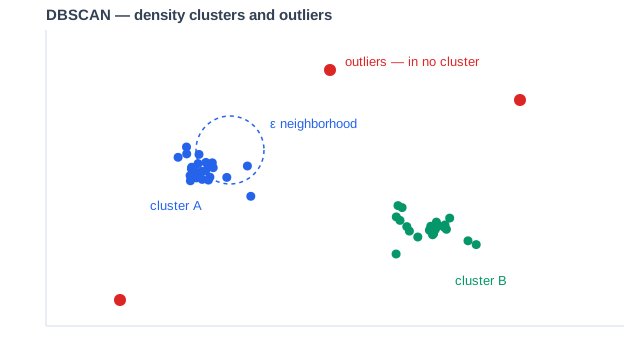
How it works
DBSCAN groups the input series by similarity: series whose behavior falls within a small neighborhood of each other form dense clusters, and clusters grow outward through chains of neighboring series. Series that end up in no cluster are the outliers — fleet members behaving unlike their peers. The tolerance parameter scales the neighborhood size, so lower values flag smaller deviations as outliers.
In Dashboards
To use dbscan in a dashboard, apply the following function:
dbscan( \
  ${promql}, \ (1)
  ${tolerance}, \ (2)
  1, 1 \
)| 1 | ${promql}: PromQL query to evaluate |
| 2 | ${tolerance}: The sensitivity of DBSCAN; value range between 0.33 and 5.0, inclusive. A lower value is more sensitive to deviations. |
For the operator reference — syntax, parameters, and a validated example — see dbscan in the PromQL documentation.
Limitations
-
The alert rule evaluates all data points pulled by the query. When used in a dashboard, it evaluates the whole data collection, not individual time slices. If a time series triggers an alert, then the whole time range is in active alerting state. This presents differently from other alert functions used in the dashboard.
-
DBSCAN clusters the set of input series against each other, so it needs enough peer series to form a meaningful cluster — applying it to one or two series cannot distinguish an outlier from a cluster.
-
Conversely, very wide inputs (hundreds of series) increase comparison cost; group to the fleet dimension you actually want to compare, such as one series per pod or per service.
Next steps
For an in-depth discussion of the DBSCAN algorithm, see these external resources:
-
DBSCAN Key Concepts and Parameters in DataCamp Tutorials
-
DBSCAN in Wikipedia