Cross-Account AWS Ingestion
When Kloudfuse runs in one AWS account and needs to receive telemetry from agents or services running in another AWS account, direct network routing is not available. AWS PrivateLink and VPC Service Endpoints provide a secure, private path across account boundaries without exposing traffic to the public internet.
This page describes the architecture and the AWS-side configuration steps. For ingress controller and TLS configuration, follow the links in Related Setup Pages.
Architecture
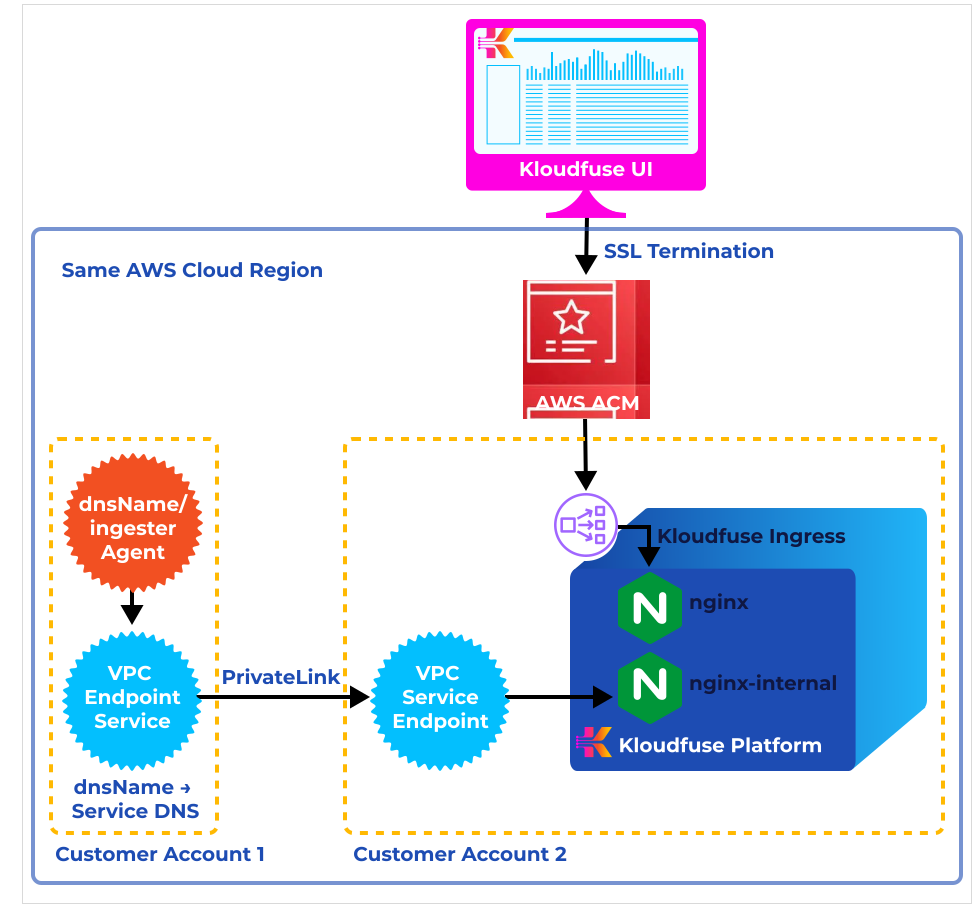
The key components are:
-
VPC Endpoint Service (Kloudfuse-hosted account): exposes the Kloudfuse Network Load Balancer as a private service.
-
VPC Endpoint (consumer account): creates a private network interface that resolves to the endpoint service.
-
AWS PrivateLink: carries traffic between the two endpoints entirely within the AWS backbone.
-
ACM Certificate: secures the Kloudfuse UI and ingestion endpoint with HTTPS. See HTTPS/TLS Setup.
-
Ingress controller: terminates TLS and routes traffic to Kloudfuse services. See Related Setup Pages.
Also see Regional Consumption Tracking for regional cluster tracking in multi-account deployments.
Prerequisites
-
A running Kloudfuse installation on EKS in the Kloudfuse-hosted account (the provider account)
-
An AWS Network Load Balancer created in Kloudfuse-hosted account
-
TLS configured on the Kloudfuse ingress — see HTTPS/TLS Setup
-
Appropriate IAM permissions in both accounts to create VPC endpoints and endpoint services
Step 1: Configure the Provider Account (Kloudfuse-hosted account)
You will expose its Network Load Balancer as a VPC Endpoint Service.
-
Connect to the Kubernetes cluster that hosts the Kloudfuse stack and retrieve the Network Load Balancer name:
kubens kfuse kubectl get service | grep ingress | grep internal | awk -F' ' '{print $4}'bashThe command returns a hostname in the form
a081addcedc4d299cfa6asdf2143bsdf9-7fe3asf1be2easd.elb.us-west-2.amazonaws.com. -
In the AWS Console, open the VPC dashboard and select Endpoint Services.
-
Create an Endpoint Service using the Network Load Balancer retrieved above as the target.
-
Wait until the endpoint service status changes to Available.
-
Select the endpoint service, choose Actions, and select Add principals to allowlist.
-
Add the ARN of the consumer account in the following format:
arn:aws:iam::<Account-1-ID>:root
-
Navigate to the endpoint service details page and copy the Service name — you will need it in the next step. It takes the form:
com.amazonaws.vpce.us-west-2.vpce-svc-asasdf96asdfsadf6
Step 2: Configure the Consumer Account
-
In the AWS Console, open the VPC dashboard, select Endpoints, and click Create Endpoint.
-
Under Service category, choose Other endpoint services.
-
Enter the service name copied from Step 1 and click Verify.
-
Under VPC, select the VPC in that will connect to Kloudfuse-hosted account.
-
Under Security group, select the security group for that VPC.
-
-
Click Create endpoint.
-
The endpoint will initially show Pending acceptance status. Go back to the Kloudfuse-hosted account, open the Endpoint Services dashboard, select the endpoint service, and under Endpoint Connections accept the pending request.
-
Wait for the endpoint status to change from Pending to Available.
-
In the Customer Account, open the endpoint details and copy the first DNS name from the list. It takes the form:
vpce-sasdgsadfasdf-01z8ed5t.vpce-svc-asasdf96asdfsadf6.us-west-2.vpce.amazonaws.com
Step 3: Update Agent Configuration
Replace the Kloudfuse ingestion URL in your agent configuration with the VPC endpoint DNS name from Step 2.
For example, with a Datadog-compatible agent dd-values-kfuse.yaml:
datadog:
  dd_url: "http://vpce-sasdgsadfasdf-01z8ed5t.vpce-svc-asasdf96asdfsadf6.us-west-2.vpce.amazonaws.com/ingester"
  process_config:
    process_dd_url: "http://vpce-sasdgsadfasdf-01z8ed5t.vpce-svc-asasdf96asdfsadf6.us-west-2.vpce.amazonaws.com/ingester"
    events_dd_url: "http://vpce-sasdgsadfasdf-01z8ed5t.vpce-svc-asasdf96asdfsadf6.us-west-2.vpce.amazonaws.com/ingester"
  orchestrator_explorer:
    orchestrator_dd_url: "http://vpce-sasdgsadfasdf-01z8ed5t.vpce-svc-asasdf96asdfsadf6.us-west-2.vpce.amazonaws.com/"
  logs_config:
logs_dd_url: "vpce-05ea299fea1593ce3-01z8ed5t.vpce-svc-05ccc49663c67653f.us-west-2.vpce.amazonaws.com:80"Related Setup Pages
The PrivateLink configuration above establishes the network path between accounts. You also need an ingress controller and TLS configured in the Kloudfuse account. Choose the ingress approach that matches your deployment:
| Setup page | When to use |
|---|---|
Required for all deployments — configures ACM certificates and HTTPS termination |
|
Using the Kloudfuse-bundled NGINX ingress controller |
|
Using a standalone NGINX controller (required for multi-AZ failover) |
|
Using Envoy Gateway as a replacement for NGINX |
|
Using standalone Envoy Gateway |
