Query Priorities Concepts
Kloudfuse uses query priorities and per-call timeouts to govern how much of the underlying analytics engine (Apache Pinot) any given query is allowed to consume. Together they let operators fast-path interactive dashboard traffic, ration the budget given to background machine traffic, and protect the cluster from runaway alert evaluation.
This page explains what query priorities are, what they affect, and how Kloudfuse decides which value to apply on each request. For step-by-step configuration, see:
-
Configure Cluster-Wide Defaults — set cluster-wide defaults that apply to everyone.
-
Override Priorities for a User, Team, or Service Account — override the defaults for specific users, teams, and service accounts.
What Query Priorities Affect
Every query that the Kloudfuse query services send to Pinot carries two options:
| Option | Effect |
|---|---|
|
Tells the Pinot broker how to schedule the query relative to others. Higher priority queries are admitted first when the broker is busy. Three regular priorities are available: High, Medium (the default), and Low. A fourth value, Blocked, is a deny sentinel that rejects the request before it reaches Pinot — see The Blocked Sentinel below. |
|
The wall-clock budget for that single Pinot call, in milliseconds. Queries that exceed the budget are aborted and return an error to the caller. |
Both values are resolved per request. The same user can issue a high-priority interactive dashboard query and a low-priority background export from the same browser session, and Kloudfuse will give each the appropriate slot.
|
The High / Medium / Low scheduler priorities take effect only when query interleaving is enabled. Starting in Kloudfuse 4.2.4, query interleaving is disabled by default and must be enabled per cluster. The Blocked priority is the exception: Kloudfuse enforces it before the query reaches Pinot, so it works regardless of which scheduler is active. |
The Blocked Sentinel
Blocked is a fourth priority value that exists alongside High / Medium / Low, but it does not map to a Pinot scheduler slot. Instead, when a request resolves to Blocked, Kloudfuse rejects the request with HTTP 403 before issuing any work to Pinot.
Use it to:
-
Temporarily deny a misbehaving user, team, or service account without revoking their account.
-
Pause an entire workload class during an incident — for example, set Blocked on the Scheduled class to stop alert evaluation and recording-rule queries while a problem is being investigated. The UI requires explicit confirmation for this case because it halts background work cluster-wide.
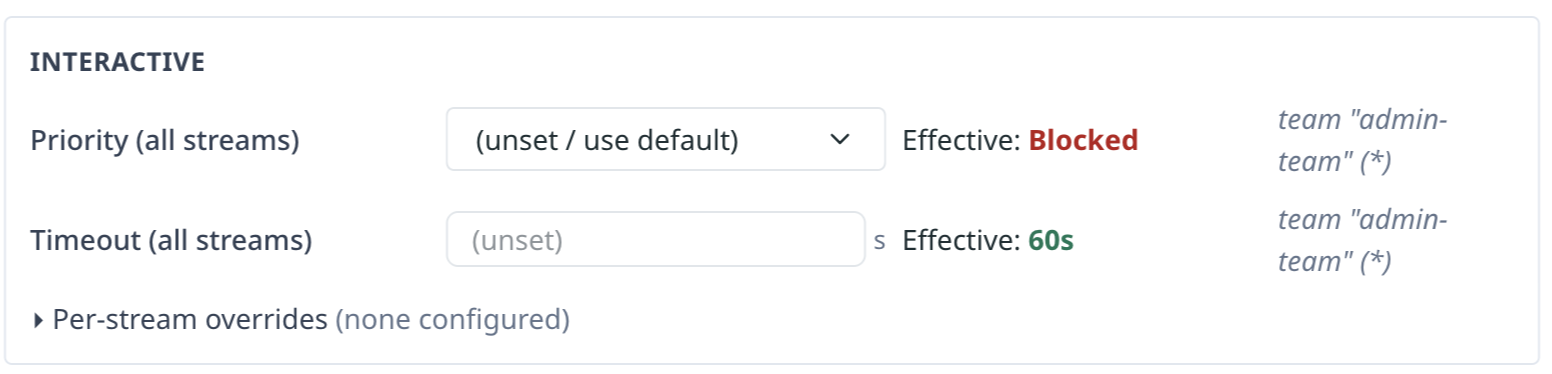
Blocked follows the same resolution chain as the other priorities (user own row > teams > class default) and is resolved per (class, stream). You can block one stream while leaving the others alone — for example, (Interactive, APM) = Blocked with no other entries denies APM dashboards but lets Metrics, Logs, RUM, and Events run normally.
In the cross-team merge, Blocked outranks High, so a single blocking team is decisive — but a user’s own row always wins over team rows, so a team admin cannot unilaterally block a user who configured their own priority.
When a row’s Effective value resolves to Blocked, the UI renders it in red, and the Source column names where the block came from (a per-entity override, a team, or a class default).
Classes
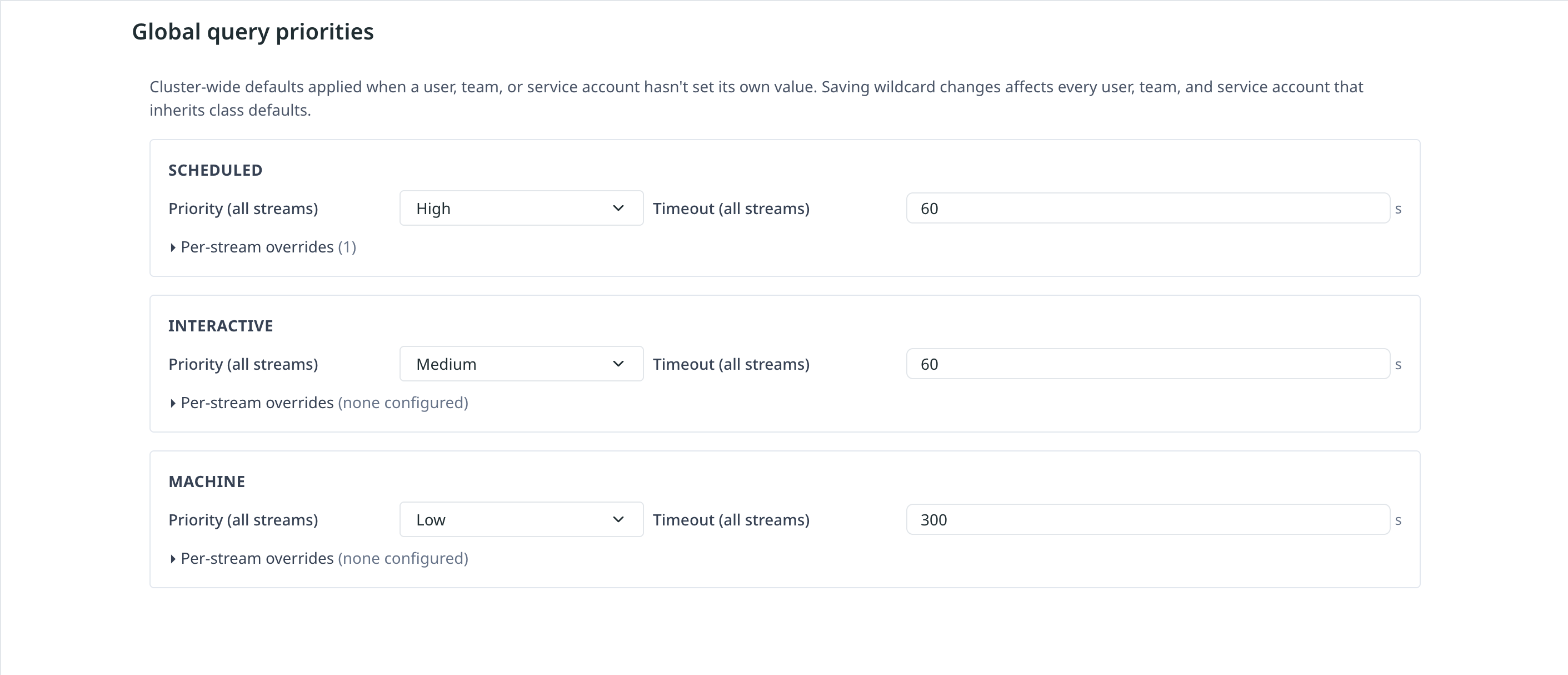
Every request belongs to one of three classes based on how it reached Kloudfuse:
- Scheduled
-
Background work the platform itself triggers — Grafana alert rule evaluation, the in-process rule manager, and periodically refreshing scheduled views. These never carry user identity, so they get their priority and timeout from cluster-wide defaults rather than from a user’s policy.
- Interactive
-
Browser traffic. Cookie / SSO / Basic-auth requests classify as interactive. This is the class your end users hit when they open a dashboard or run an ad-hoc query.
- Machine / Agent
-
Programmatic traffic. Bearer tokens, MCP-OAuth requests, and service account calls all classify as machine. Service accounts can only configure values for the machine class.
The class is decided by user-mgmt-service at authentication time and travels with the request. Service account detail pages only expose the Machine / Agent class; user and team detail pages expose both Interactive and Machine / Agent. The Scheduled class is system-only — it is not configurable per-entity and only appears on the cluster-wide Global query priorities page.
Streams
Each class has per-stream entries so different telemetry types can be tuned independently:
-
APM (
apm) -
Events (
events) -
Logs (
logs) -
Metrics (
metrics) -
RUM (
rum) -
All streams (the wildcard
*)
Most operators configure only the wildcard row; the per-stream rows let you make specific streams faster or slower than the rest. For example, you can give Logs queries a longer timeout than Metrics queries while keeping a single shared priority.
Resolution Precedence
When a request arrives, Kloudfuse walks the following sources in order and picks the first value it finds for each of schedulerPriority and timeoutMs:
-
If the request is in the Scheduled class: the cluster-wide Scheduled class default for the request’s stream (with
wildcard fallback). If noScheduledrow is configured, the query gets *High priority and the server-default timeout — the platform fast-paths its own work. -
Otherwise, the entity’s own per-entity row for that class and stream (with
wildcard fallback). For users, this is whatever you set on the *User detail page. -
For users, the union of every team the user belongs to. When multiple teams supply values, Kloudfuse picks the highest priority and the lowest timeout. Blocked outranks High in this merge, so any single team that blocks a (class, stream) makes that combination blocked for the user; among non-blocked teams, the most-permissive priority and the strictest timeout win.
-
The cluster-wide class default for the request’s stream (with
wildcard fallback) — set on the *Global query priorities page.
The first match in this chain wins. The Source column on the Effective display in the UI tells you which step provided the resolved value (for example, class default (*), user override (apm), team "oncall" (logs)).
When to Configure What
| Goal | Where to configure |
|---|---|
Set safe baselines for every user and service account in the cluster |
Global query priorities — Interactive and Machine / Agent class defaults. |
Cap how long alert / scheduled-view queries may run |
Global query priorities — Scheduled class default. |
Give a specific service account more headroom than the cluster default |
Service Account detail page — Machine / Agent class. |
Give an oncall team faster log queries than other teams |
Team detail page — Interactive class, Logs per-stream override. |
Throttle a single user who is overwhelming the cluster |
User detail page — Lower the priority or timeout for the relevant stream. |
Deny a misbehaving user / team / service account without revoking their account |
Entity detail page — set the relevant (class, stream) to Blocked. |
Pause all alert evaluation / scheduled-view refreshes during an incident |
Global query priorities — set the Scheduled class to Blocked. Remember to revert it once the incident clears. |