Best practices for managing alerts
Follow these recommendations when designing alerts in Kloudfuse to ensure they fire reliably, remain actionable, and provide useful context for troubleshooting.
Configure Alerts with Min and Max Conditions
When creating alerts in Kloudfuse, use the Min, Max, and Last conditions carefully. Improper setup may cause alerts to miss critical events or trigger inconsistently.
Steps
-
Min condition
-
Max condition
-
Last condition
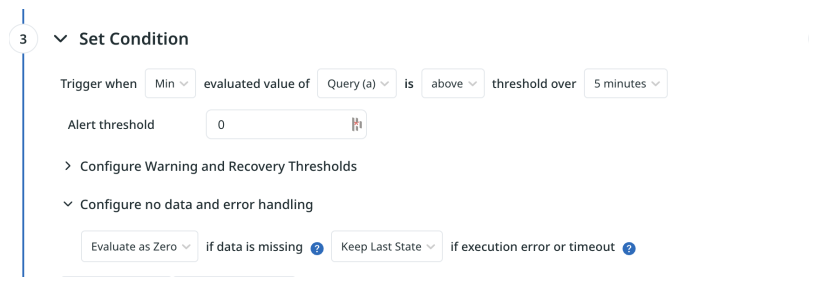
Use Min when you want the alert to fire only if the minimum of all data points in the evaluation window crosses the threshold — i.e., use Min for "is above" (>). This guarantees the condition is true for every point in the range (no intermittent breaches).
-
In the Set Condition section:
-
Select Min as the Trigger when option (use this for
is above/>semantics). -
Choose the query (for example,
Query (a)). -
Set the comparison rule, such as is above threshold over 5 minutes.
-
-
Enter the Alert threshold value.
-
Expand Configure Warning and Recovery Thresholds if needed.
-
Under No data and error handling, select:
-
Evaluate as Zero → if data is missing.
-
Keep Last State → if there is an execution error or timeout.
-
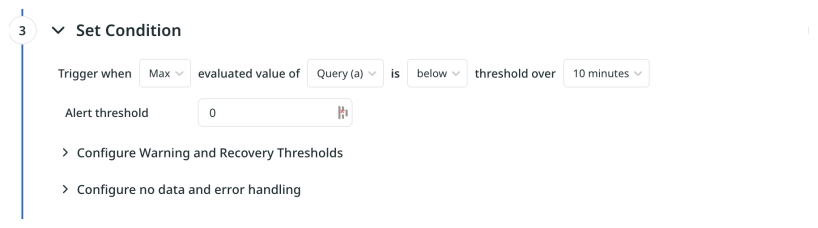
Use Max when you want the alert to fire only if the maximum of all data points in the evaluation window crosses the threshold — i.e., use Max for "is below" (<). This guarantees the condition is true for every point in the range (the metric stayed below the threshold).
-
In the Set Condition section:
-
Select Max as the Trigger when option (use this for
is below/<semantics). -
Choose the query (for example,
Query (a)). -
Set the comparison rule, such as is below threshold over 10 minutes.
-
-
Enter the Alert threshold value.
-
Expand Configure Warning and Recovery Thresholds if needed.
-
Under No data and error handling, select options based on your monitoring needs.
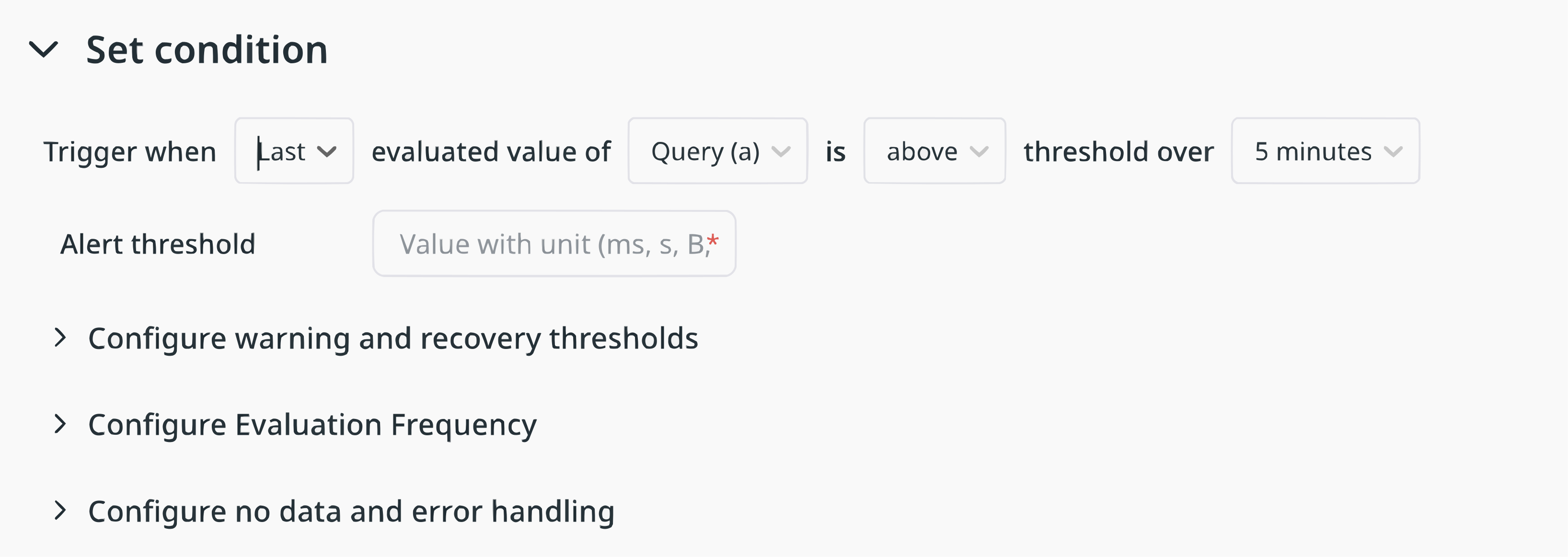
Use Last when you only want to evaluate the most recent data point (point-in-time checks or spike detection). Last applies the comparison directly to the latest sample and is useful when brief, recent changes should immediately trigger an alert.
-
In the Set Condition section:
-
Select Last as the Trigger when option.
-
Choose the query (for example,
Query (a)). -
Set the comparison rule, such as is above threshold or is below threshold.
-
-
Enter the Alert threshold value.
-
Configure warning/recovery thresholds if needed.
-
Under No data and error handling, select options based on your monitoring needs.
Notes
-
Min: Use when you need
is abovebehavior (minimum > threshold) — e.g., Get alerted if cpu going over 80% over 5 minutes but not for a spike -
Max: Use when you need
is belowbehavior (maximum < threshold) — e.g., Get alerted if total requests falls below a threshold which can happen after a new deployment. -
Last: Use for point-in-time checks or spike detection when only the most recent sample matters. E.g. if you want to get alerted immediately for pod restart and don’t want to wait for it to auto heal
-
After initial setup, test the alert by adjusting the time range or threshold. If you temporarily used Evaluate as Zero to tune behavior, disable it once the alert is finalized.
Ensure Alerts Are Meaningful and Actionable
Set up alerts that are meaningful and actionable.
Consider the impact of having an alert configuration in your system with the following characteristics:
-
Alerts are being constantly triggered.
-
Alerts resolve themselves before someone can take action.
-
Alerts don’t provide information on what the problem is.
-
Alerts are a result of a problem that cannot be addressed by the team.
These situations inevitably result in your team ignoring ALL the alerts. Therefore, exercise good judgement in designing and implementing your alerting framework.
Add links to the Alert
You can add links to an Alert to associate it with documentation that helps to troubleshoot the issue. Kloudfuse provides several options:
- Link to a Runbook
-
Create and maintain instructions on how to proceed when the alert is triggered.
- Link a Dashboard
-
To help with troubleshooting, associate a Dashboard with the Alert.
- Link a Panel
-
Especially useful when working with large dashboards, link the alert to a specific panel in the Dashboard.