AWS Integration Architecture
Kloudfuse integrates with AWS to collect metrics, logs, and events from your cloud infrastructure. This page explains the overall architecture, how data flows from AWS services into Kloudfuse, and how to choose the right integration method for your use case.
Overview
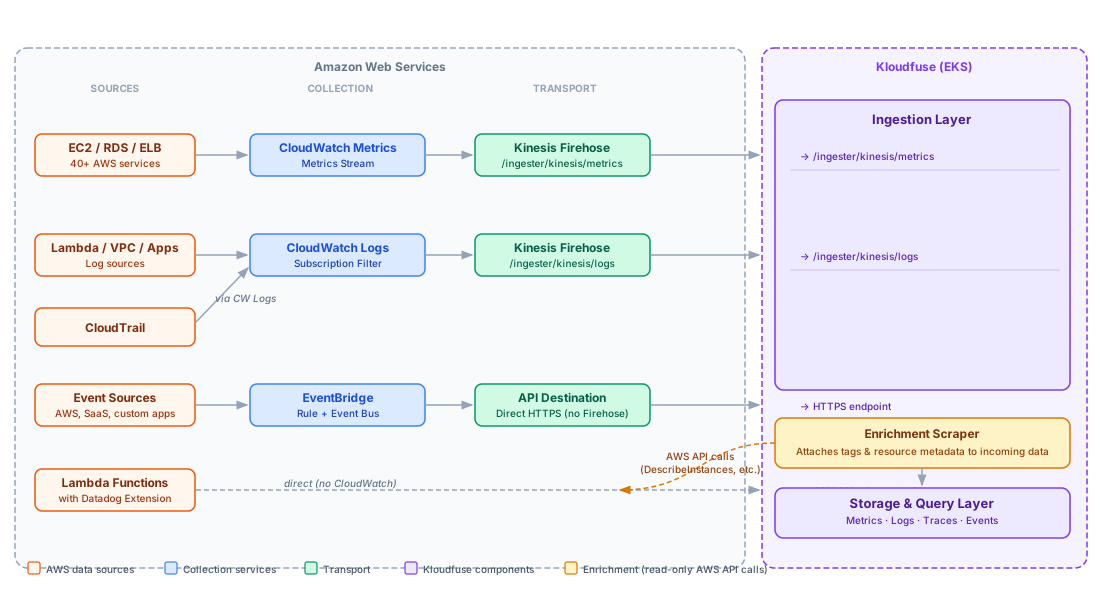
Kloudfuse runs on an Amazon EKS cluster and exposes HTTPS ingestion endpoints. AWS services deliver telemetry data to these endpoints via AWS Kinesis Firehose (for metrics and logs) or direct HTTP calls (for EventBridge). An enrichment scraper runs inside Kloudfuse and calls AWS APIs to attach resource metadata — such as tags, instance types, and environment labels — to the incoming data.
Data Flow
CloudWatch Metrics
CloudWatch publishes service metrics at regular intervals. A Metrics Stream continuously forwards those metrics to a Kinesis Firehose delivery stream, which batches and delivers them to the Kloudfuse ingester over HTTPS.
CloudWatch Logs
Log groups in CloudWatch are subscribed to Kinesis Firehose via a subscription filter. Kloudfuse receives the log records in real time as they are written to CloudWatch.
CloudTrail Audit Events
CloudTrail records every API call made in your AWS account. Routing CloudTrail through CloudWatch Logs means you can use the same Kinesis Firehose delivery stream you set up for logs.
EventBridge Events
EventBridge routes matching events directly to Kloudfuse via an API Destination. This path does not use Kinesis Firehose — events are delivered one at a time as they occur.
Lambda Telemetry
Lambda telemetry can reach Kloudfuse through more than one path, depending on the method you choose. See AWS Lambda Integration for a full comparison. Automatic CloudWatch metrics and logs follow the Kinesis Firehose paths above; the Datadog Extension Layer delivers APM and custom metrics directly to Kloudfuse without CloudWatch.
Enrichment
Raw CloudWatch metrics and logs contain limited context — typically just a resource identifier and a namespace.
The Kloudfuse enrichment scraper calls AWS APIs (EC2 DescribeInstances, RDS DescribeDBInstances, ECS ListClusters, and others) to retrieve resource tags and attributes, then attaches them as labels to every incoming metric and log.
This means you can filter and group your dashboards and alerts by tags such as environment, team, application, or any custom tag you have applied to your AWS resources.
Enrichment is configured via Helm values in the ingester.config section.
See Enable Metrics Enrichment for configuration details.
Choosing an Integration Method
Use the following table to decide which integration or combination of integrations is right for your use case.
| Integration | What it collects | When to use it |
|---|---|---|
Infrastructure metrics for 40+ AWS services (EC2, RDS, ELB, Lambda, DynamoDB, and more) |
Always. This is the primary integration for AWS infrastructure observability. |
|
Log streams from any CloudWatch log group: application logs, VPC Flow Logs, Lambda logs, and others |
When you want to centralise AWS log data alongside your metrics in Kloudfuse. |
|
A full audit trail of every API call made in your AWS account |
When you need security monitoring, compliance reporting, or API activity history. |
|
Real-time events matching a custom pattern from any AWS service, SaaS connector, or application |
When you need real-time alerting on specific event patterns, cross-account event routing, or custom application events. Not a replacement for CloudWatch Logs bulk ingestion. |
|
Invocation metrics, function logs, custom metrics, and traces from Lambda functions |
When you are monitoring serverless workloads and need deeper visibility beyond the automatic CloudWatch metrics (e.g., custom metrics or APM traces from function code). |
|
Infrastructure provisioning (EKS cluster, VPC, ACM, Route 53) |
When deploying or managing the Kloudfuse cluster itself on AWS. |
|
Data collection across multiple AWS accounts or VPCs |
When your workloads span more than one AWS account and you want a single Kloudfuse instance to observe all of them. |
Kinesis Firehose as the Transport Layer
AWS Kinesis Firehose is the recommended delivery mechanism for both metrics and logs because it:
-
Provides reliable, buffered delivery with automatic retry
-
Supports HTTP endpoint destinations with configurable batch size and interval
-
Scales automatically to match ingestion volume
-
Works within AWS network boundaries, supporting PrivateLink for private delivery
Both the metrics and logs integrations require a Kinesis Firehose delivery stream. See Configure AWS Kinesis Firehose for Kloudfuse for setup instructions shared by both integrations.
IAM Authentication Approaches
Kloudfuse supports three methods for authenticating with AWS APIs (used by the enrichment scraper):
| Method | How it works | When to use it |
|---|---|---|
Access Key + Secret |
Create an IAM user, generate access keys, store in a Kubernetes secret |
Simpler to set up; suitable for non-production or single-account environments |
IAM Role ARN |
Attach a cross-account IAM role ARN to the scraper config; Kloudfuse assumes the role |
Recommended for multi-account setups; no long-lived credentials |
IRSA (IAM Roles for Service Accounts) |
Annotate the Kubernetes service account with a role ARN; AWS injects credentials via the EKS OIDC provider |
Recommended for production; most secure; no credentials stored in Kubernetes secrets |
