Access Control Architecture
Overview
Kloudfuse access control is built from a set of components that work together to answer two questions for every request: what data can this identity query? and what content can this identity see and edit?
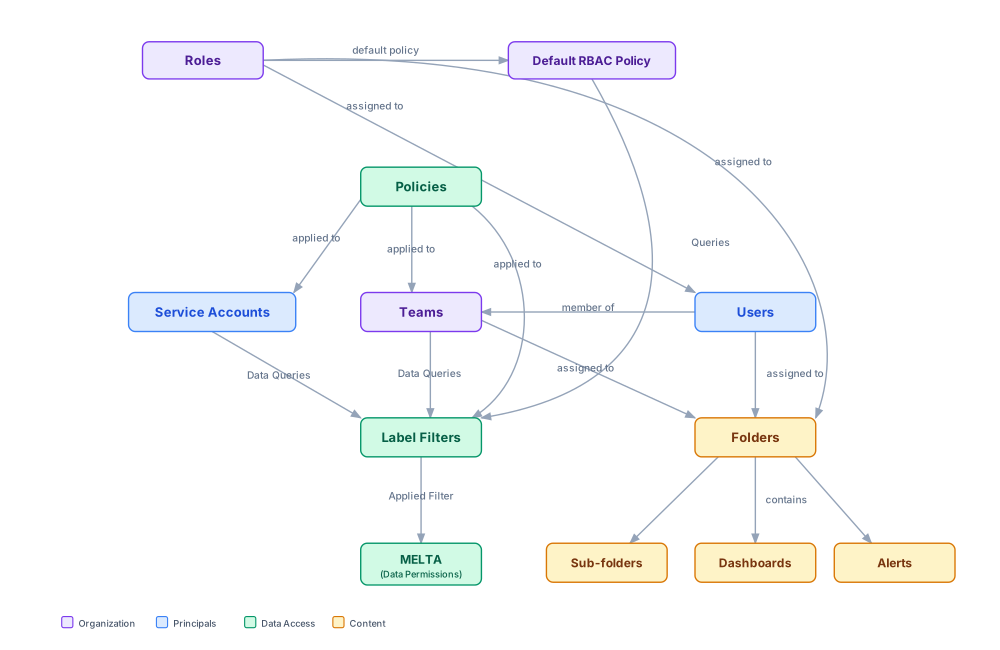
The diagram shows two distinct access paths:
-
Data Access — Roles, and Policies are used to apply Label Filters. These filters are then used to restrict the MELTA streams a Team or Service Account can query.
-
Content Access — Users, Roles, and Teams are assigned to Folders, which contain Dashboards, Alerts, and Sub-folders.
Principals
Principals are the identities that interact with Kloudfuse. There are two types:
Users
A User is a human account authenticated through the login page or an SSO provider. Every User is assigned exactly one Role, and Users can be members of one or more Teams. Through their Team memberships, Users inherit data access policies and folder permissions.
See Manually Assigning User Roles for instructions on assigning roles to Users.
Service Accounts
A Service Account is a non-human identity used for system integrations, automated pipelines, and API access. Service Accounts are not members of Teams. Instead, data access for a Service Account is controlled directly by applying a Policy to it, and the resulting Label Filter governs which telemetry streams the account can query.
Roles
A Role is assigned to a User and determines their platform-level capabilities — what they can create, edit, delete, and administer. Kloudfuse provides three roles:
Admin |
Full access to all platform features and all telemetry data, regardless of any Policy or Label Filter configuration. |
|---|---|
Editor |
Can create and edit most resources. Data visibility is controlled by the |
Viewer |
Read-only access to platform resources. Data visibility is controlled by the |
A User’s Role can be assigned directly to a Folder, granting all Users with that Role access to the Folder’s contents.
See Role Permissions for the full permissions matrix.
Teams
A Team is a group of Users. Teams serve as the primary mechanism for granting folder and data access:
-
Policies are applied to a Team to control which telemetry data its members can query.
-
Teams can be assigned to Folders to control access to Dashboards, Alerts, and Sub-folders within that Folder.
Users can belong to multiple Teams, and the union of those Teams' Policies determines the data the User can access. Teams can be managed directly in the Admin interface or synchronized automatically from an SSO identity provider.
Data Access
Policies
A Policy is a set of label-based rules that restrict which telemetry streams an identity can query. Policies are applied to:
-
Teams — all members of the Team inherit the Policy’s label filters.
-
Users — a Policy can be assigned directly to an individual User, in addition to any policies inherited through Team membership.
-
Service Accounts — the Policy governs what telemetry the account can access when making API calls.
When a Policy is applied, it produces a Label Filter that is evaluated against every data query made by that identity.
Default RBAC Policy
The Default RBAC Policy is a cluster-wide fallback that applies to Editor and Viewer Users when no explicit Policy has been assigned through their Teams. It is tied to the Role assigned to the User and is configured in custom_values.yaml:
-
rbac_allow_all— the User can query all telemetry streams (full data access). -
rbac_allow_none— the User is denied access to all telemetry streams.
Admin Users always receive full data access regardless of this setting.
Label Filters
A Label Filter is the runtime representation of a Policy’s rules. When a Team or Service Account makes a data query, Kloudfuse applies the relevant Label Filter to restrict the query to the permitted telemetry streams before it reaches the MELTA data layer. The filter is derived from:
-
An explicitly assigned Policy (for Teams and Service Accounts), or
-
The Default RBAC Policy (for Users with no explicit Policy).
Content Access
Folders
Folders are organizational containers that hold Dashboards, Alerts, and Sub-folders. Access to a Folder is controlled by assigning one or more of the following to it:
-
Users — grant a specific User access to the Folder’s contents.
-
Roles — grant all Users with a given Role access to the Folder’s contents.
-
Teams — grant all members of a Team access to the Folder’s contents.
Folders can be nested: a Sub-folder inherits permissions from its parent Folder, but can also have its own assignments to restrict or expand access further.
See Folder Permissions for Folder management instructions.