Miscellaneous operators
- backshift
- base64Decode
- base64Encode
- compareCIDRPrefix
- concat
- decToHex
- dedup
- format
- formatDate
- getCIDRPrefix
- hash
- hexToAscii
- hexToDec
- in
- ipv4ToNumber
- isBlank
- isEmpty
- isNumeric
- isPrivateIP
- isPublicIP
- isValidIP
- len
- luhn
- maskFromCIDR
- matches
- now
- parseDate
- queryEndTime
- queryStartTime
- queryTimeRange
- replace
- substring
- timeslice
- toBytes
- toDuration
- toFloat
- toInt
- toLowerCase
- toUpperCase
- transpose
- trim
- urlDecode
- urlEncode
Use these functions in the Advanced Search interface to perform relatively complex data transformations. The Logs Query Builder does not natively support these functions.
- backshift
-
Shifts a column in a table down by the specified number.
- base64Decode
-
Converts a base64 string into to an ASCII/UTF-8 string.
- base64Encode
-
Converts an ASCII/UTF-8 string to a base64 string.
- compareCIDRPrefix
-
Checks if the network prefixes of two IPv4 addresses match.
- concat
-
Concatenates multiple strings and numbers into a new string.
- decToHex
-
Converts long value to hexadecimal value.
- dedup
-
Removes duplicate results in a table by a set of columns.
- format
-
Returns a formatted string given a format specifier and arguments.
- formatDate
-
Returns a date string given a date, format, and timezone (default UTC).
- getCIDRPrefix
-
Retrieves the network prefix from an IPv4 address.
- hash
-
Hashes data into a string value using the specified hash algorithm.
- hexToAscii
-
Converts hexadecimal string to ASCII value.
- hexToDec
-
Converts hexadecimal string to a long value.
- in
-
Checks if a field is in a set of string values or number values.
- ipv4ToNumber
-
Converts an Internet Protocol version 4 (IPv4) IP address from the octet dot-decimal format to a decimal format.
- isBlank
-
Checks if a string value is null, empty, or contains only empty characters.
- isEmpty
-
Checks if a string value is an empty string that contains no characters or whitespace.
- isNumeric
-
Checks if a string value can be parsed as a number.
- isPrivateIP
-
Checks if an IPv4 address is private.
- isPublicIP
-
Checks if an IPv4 address is public.
- isValidIP
-
Checks if an IPv4 or IPv6 address is valid.
- len
-
Returns the length of a string.
- luhn
-
Validates credit card numbers in a string value using Luhn’s algorithm.
- maskFromCIDR
-
Returns the subnet mask given a prefix length for IPv4 addresses.
- matches
-
Matches strings using the RE2-compliant regex format.
- now
-
Returns the current epoch time in milliseconds.
- parseDate
-
Parses a date string with the given format pattern and optional timezone (default UTC), and returns the corresponding epoch milliseconds.
- queryEndTime
-
Returns the end time of the search in milliseconds.
- queryStartTime
-
Returns the start time of the search in milliseconds.
- queryTimeRange
-
Returns the time range for the query being executed, in milliseconds.
- replace
-
Replaces all occurrences of a specified string with another string.
- substring
-
Extracts a part of a given string and start/end offsets.
- timeslice
-
Buckets each event’s timestamp into fixed-width time windows for use in time-series aggregation.
- toBytes
-
Parses a string representation of bytes (KB, MB, GB, and so on) into the number of bytes it represents.
- toDuration
-
Parses a string representation of time (ns, µs, ms, s, m, h) to milliseconds.
- toFloat
-
Parses a string representation of a number or a number to a float.
- toInt
-
Parses a string representation of a number, or a number to an
int. - toLowerCase
-
Converts all letters of a string to lowercase.
- toUpperCase
-
Converts all letters of a string to uppercase.
- transpose
-
Converts aggregate query results from a long format into a wide, tabular format by pivoting row values into column headers.
- trim
-
Removes starting and trailing empty spaces in a string.
- urlDecode
-
Returns an unescaped URL string.
- urlEncode
-
Encodes a URL into the ASCII character set.
backshift
Shifts a column in a table down by the specified number.
For the views table.
The default shift is 1.
The default alias, when used on the command line, is _backshift.
compareCIDRPrefix
Checks if the network prefixes of two IPv4 addresses match.
- Syntax
-
| compareCIDRPrefix(<ipv4String>, <ipv4String>) as <alias>none - Examples
-
The following example returns K with a value of true.
| compareCIDRPrefix("10.10.1.35", "10.10.1.35", 24) as KnoneThe following example returns K with a value of false.
| compareCIDRPrefix("10.10.1.35", "11.11.2.35", 24) as Knone
formatDate
Returns a date string given a date, format, and timezone (default UTC).
- Syntax
-
| formatDate(<dateMilliseconds>) as <alias>

| formatDate(<dateMilliseconds>, <formatString>) as <alias>

| formatDate(<dateMilliseconds>, <formatString>, <timezoneString>) as <alias>
none - Examples
-
The following example returns K with a value of
2024-11-06 20:33:37.| formatDate(1730925217838) as KnoneThe following example returns K with a value of
2024-11-06.| formatDate(1730925217838, "YYYY-MM-dd") as KnoneThe following example returns K with a value of
2024-11-06 12:33:37.838 PM.| formatDate(1730925217838, "yyyy-MM-dd hh:mm:ss.SSS a", "America/Los_Angeles") as Knone
hash
Hashes data into a string value using the specified hash algorithm.
Supported hash algorithms are MD5, SHA1, SHA2, and MurmurHash3.
- Syntax
-
| hash(<field>) as <alias>

| hash(<field>, <hashAlgorithm>) as <alias>

where <hashAlgorithm> is either md5(default), sha1, sha2_256, or murmur3_128
none - Examples
-
The following example returns K with a value of
5eb63bbbe01eeed093cb22bb8f5acdc3.| hash("hello world") as KnoneThe following example returns K with a value of
2aae6c35c94fcfb415dbe95f408b9ce91ee846ed.| hash("hello world", "sha1") as Knone
in
Checks if a field is in a set of string values or number values.
- Syntax
-
-
where
-
if
| where <field> in (<value_1>[, <value_2>, <value_3>, ...])`none| if(<field> in (<value_1>[, <value_2>, <value_3>, ...]), <value_if_true>, <value_if_false>) as <field>none -
- Examples
-
-
where
-
if
| source="pinot-server" | parse "[*]" as class | where class in ("ServerQueryLogger", "AppInfoParser")none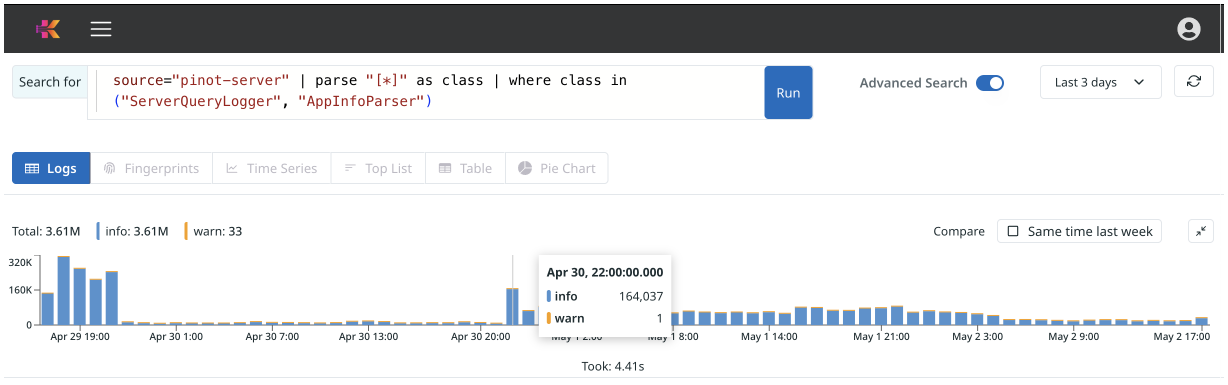
| source="pinot-server" | parse "[*]" as class | if (class in ("ServerQueryLogger", "AppInfoParser"), "true class", "false class") as myClassnone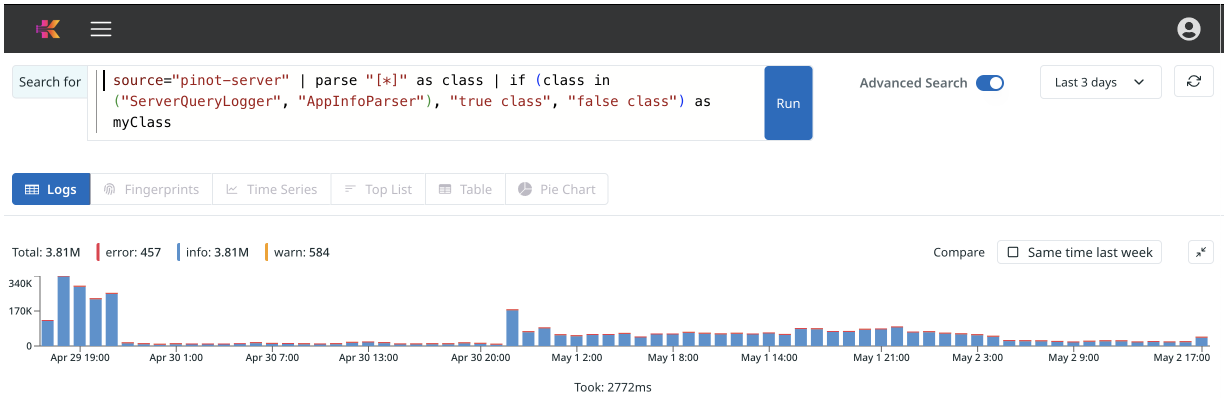
-
luhn
Validates credit card numbers in a string value using Luhn’s algorithm.
The operator removes all non-numeric values and checks if the resulting string is a valid credit card number.
matches
Matches strings using the RE2-compliant regex format.
- Syntax
-
-
where
-
if
| where <string expression> matches "<regex>"none| if(<field> matches <regex_pattern>, <value_if_true>, <value_if_false>) as <field>none -
- Examples
-
-
where
-
if
| source="pinot-server" | parse "[*]" as class | where class matches "Server.*"none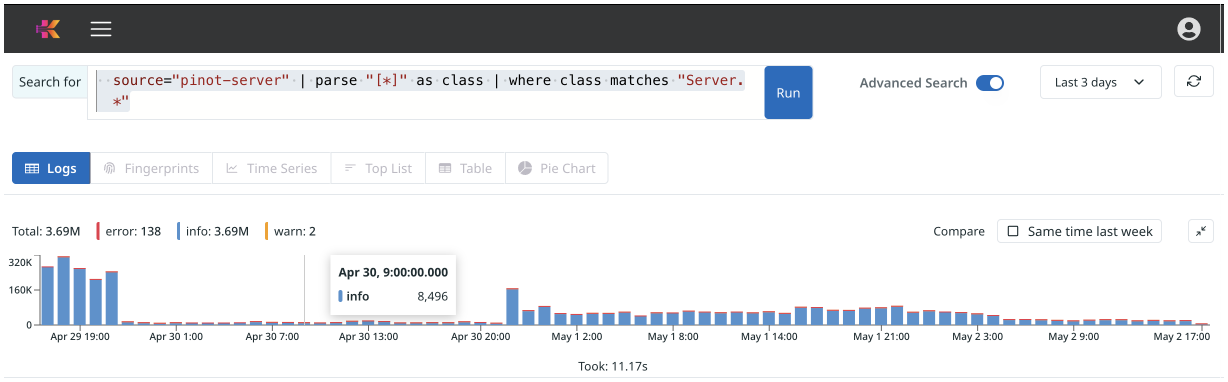
| source="pinot-server" | parse "[*]" as class | if (class matches "Server.*", "match found", "match not found") as myClassnone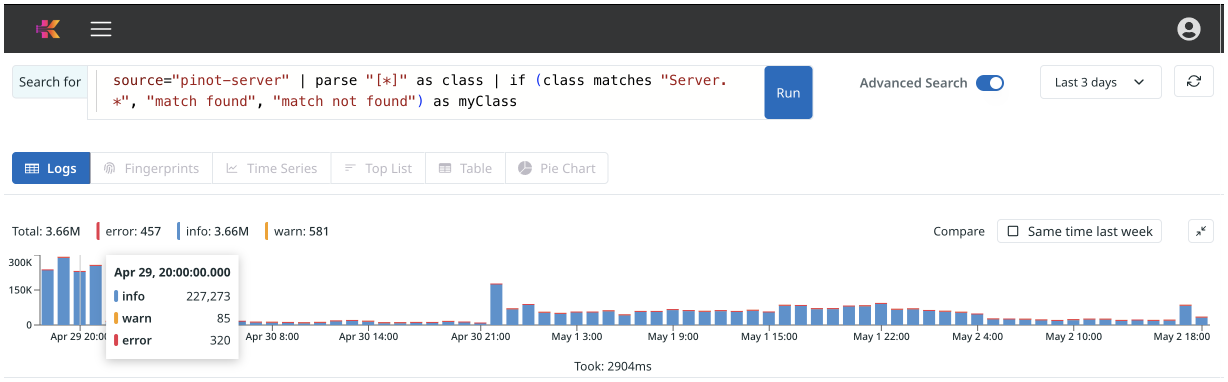
-
parseDate
Parses a date string with the given format pattern and optional timezone (default UTC), and returns the corresponding epoch milliseconds.
The inverse of formatDate; uses the same format pattern tokens.
- Syntax
-
| parseDate(<dateString>, <formatString>) as <alias>

| parseDate(<dateString>, <formatString>, <timezoneString>) as <alias>
none - Examples
-
The following example returns K with a value of
1730925217000.| parseDate("2024-11-06 20:33:37", "yyyy-MM-dd HH:mm:ss") as KnoneThe following example returns K with a value of
1730851200000.| parseDate("2024-11-06", "yyyy-MM-dd") as KnoneThe following example returns K with a value of
1730925217838.| parseDate("2024-11-06 12:33:37.838 PM", "yyyy-MM-dd hh:mm:ss.SSS a", "America/Los_Angeles") as Knone
replace
Replaces all occurrences of a specified string with another string.
The specified string can be a literal or regex.
- Syntax
-
| replace(<sourceString>, <searchString>, <replaceString>) as <alias>

| replace(<sourceString>, <regexString>, <replaceString>) as <alias>
none - Examples
-
The following example returns K with a value of
hello gopher.| replace("hello world", "world", "gopher") as KnoneThe following example returns K with a value of
"http://kloudfuse.com/products//logs".| replace("http://kloudfuse.com/products/12345678/logs", "[0-9]{5,}", "") as Knone
substring
Extracts a part of a given string and start/end offsets.
If not including an offset, the substring is until the end of the source string.
timeslice
Buckets each event’s timestamp into fixed-width time windows for use in time-series aggregation.
The bucket value is exposed as _timeslice (epoch milliseconds) and is the standard grouping field for log-based time-series aggregations.
- Syntax
-
| timeslice <duration> | timeslice <duration> as <alias>none<duration>accepts FuseQL duration literals such as1m,5m,1h,1d,7d. Whenas <alias>is omitted, the bucket field is named_timeslice. - Examples
-
Count events per 5-minute bucket:
* | timeslice 5m | count by (_timeslice)noneGroup by an additional dimension to produce one series per source:
* | timeslice 1m | count by (_timeslice, source)noneUse a custom alias for the bucket field:
* | timeslice 1m as bucket | count by (bucket, status_code)none
To produce a time series, include _timeslice (or the alias) in the by clause. Without it, the aggregation collapses the entire query range into a single value:
* | count
* | timeslice 1m | count by (_timeslice)The window operators (accum, rollingstd, smooth, total) and anomaly detection all expect a timeslice-produced series upstream.
Bucket alignment
Buckets are anchored to the Unix epoch (1970-01-01 00:00:00 UTC), not to a calendar week, month, or year. Boundaries fall at every multiple of <duration> measured from the epoch:
-
Durations that evenly divide 24 hours (
1m,5m,15m,1h,4h,12h) align to UTC midnight, because UTC midnight is itself a multiple of the duration measured from the epoch. -
Durations that do not divide 24 hours (
7h,13m) remain anchored to the epoch grid but their boundaries drift across the day — they do not land on UTC midnight. -
Multi-day durations (
2d,7d,10d) follow the epoch grid, not calendar boundaries. Withtimeslice 7d, week boundaries always fall on a Thursday because 1970-01-01 was a Thursday. Withtimeslice 10d, boundaries shift through the calendar and do not realign at the start of a month or year.
| Multi-day buckets do not align to calendar weeks or months. For calendar-aligned buckets (for example, "Monday–Sunday" or "first of the month"), pre-process the timestamp with formatDate and group by the formatted value instead. |
Bucket label
_timeslice is the bucket’s right (upper) edge, expressed as epoch milliseconds in UTC. An event with timestamp T lands in (B, B + <duration>] where B + <duration> is the smallest grid boundary ≥ T; that value is the label.
For example, with timeslice 5m and a query starting at 2026-05-04T12:03:00Z, bucket labels are 12:05, 12:10, 12:15, … An event at 12:07:42Z falls in (12:05, 12:10] and is labeled 12:10.
A small number of operators upstream of timeslice (json multi, parse multi, dedup, cat, backshift, compose) cause the engine to emit the bucket’s left edge instead. Plain aggregation queries use the right-edge labeling described here.
|
Bucket labels can fall in the future
Because the label is the right edge, the in-progress bucket is labeled slightly after the events it contains. For minute-scale buckets the offset is negligible; for hour- or day-scale buckets it can be significant, and the label can sit later than the current wall-clock time.
Example with timeslice 7d. If today is Friday 2026-05-01 and you ingest logs with current timestamps, the most recent 7-day boundary is Thursday 2026-04-30 00:00 UTC, so today’s logs land in (2026-04-30 00:00, 2026-05-07 00:00] — labeled 2026-05-07 00:00 UTC, six days in the future.
The same applies to any large <duration> (12h, 1d, 7d, 30d, …): the in-progress bucket’s label leads its latest event by up to <duration>. Practical consequences:
-
Dashboards rendering
_timesliceon the x-axis plot the in-progress bucket at a future timestamp. -
To recover the bucket start, subtract the duration:
_timeslice - <duration_ms>. -
The in-progress bucket is partial; subsequent queries can change its value as more data arrives.
transpose
Converts aggregate query results from a long format into a wide, tabular format by pivoting row values into column headers.
Similar to a pivot table in Excel, the transpose operator transforms query results from a long list format into a wide table format in the Aggregates tab. You specify which fields define the rows and which define the columns.
The transpose operator dynamically creates columns for aggregate search results, allowing you to design queries without knowing the output schema in advance. This is particularly useful for formatting data for dashboard panels and charts.
- Syntax
-
| transpose row <row_field1>[, <row_field2>, ...] column <column_field1>[, <column_field2>, ...]none - Examples
-
Without transpose, the following query produces a long-format table that is difficult to read:
source="pinot-server" | timeslice 5m | count by _timeslice, status_codenoneWith transpose, you can pivot the results to display status codes as columns and timeslices as rows:
source="pinot-server" | timeslice 5m | count by _timeslice, status_code | transpose row _timeslice column status_codenoneThis transforms the data into an easy-to-read table where each status code becomes its own column, with counts displayed across time intervals.
The transpose operator supports multiple aggregate functions. When using multiple aggregates (e.g., count and avg), each combination of column values will generate separate columns for each aggregate:
source="pinot-server" | timeslice 5m | count as request_count, avg(response_time) as avg_response by _timeslice, status_code | transpose row _timeslice column status_codenoneThis creates columns like
request_count|200,avg_response|200,request_count|404,avg_response|404, etc.
urlDecode
Returns an unescaped URL string.
- Syntax
-
| urlDecode(<urlString>) as <alias>none - Example
-
The following example returns K with a value of
http://example-server123.org/api/v1/data.php?auth=AbCdEfGhIjKlMnOpQrStUvWxYz123456&;.| urlDecode("http%3A%2F%2Fexample-server123.org%2Fapi%2Fv1%2Fdata.php%3Fauth%3DAbCdEfGhIjKlMnOpQrStUvWxYz123456%26") as Knone
urlEncode
Encodes a URL into the ASCII character set.
- Syntax
-
| urlDecode(<urlString>) as <alias>none - Example
-
The following example returns
Kwith a value ofhttp%3A%2F%2Fexample-server123.org%2Fapi%2Fv1%2Fdata.php%3Fauth%3DAbCdEfGhIjKlMnOpQrStUvWxYz123456%26.| urlDecode("http://example-server123.org/api/v1/data.php?auth=AbCdEfGhIjKlMnOpQrStUvWxYz123456&") as K.none
