Log Archive Architecture
Log archiving gives you long-term, low-cost retention of pre-processed logs in a cloud storage bucket that you own, and a way to bring any slice of that data back into Kloudfuse when you need to work with it. This page explains how the two halves — archiving and hydration — fit into the log pipeline. For the settings themselves, see Configuring Log Archives.
Overview
Archiving and hydration are two independent flows over the same bucket:
-
Archiving (write path) runs continuously. As logs are ingested, matching logs are streamed to cloud storage in compressed, timestamp-partitioned objects.
-
Hydration (read path) runs on demand. A hydration job reads a chosen time range back out of an archive and re-indexes it into Kloudfuse for a retention period you set.
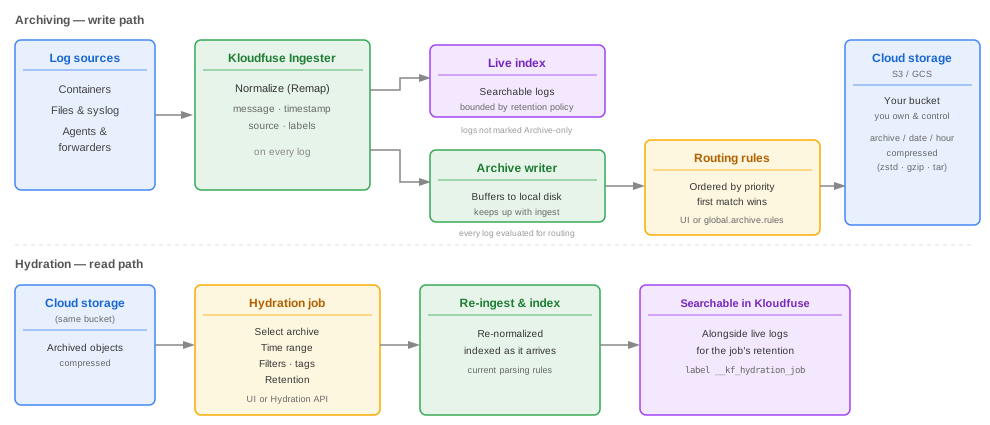
The write path: archiving
-
Ingest and normalize. Every log arrives at the Kloudfuse ingester, which normalizes it — resolving the message, timestamp, source, and labels — through the log remap pipeline. Archiving happens after this step, so archived logs carry the same facets, labels, and tags as your live logs.
-
Fan out. The normalized log is sent down two paths at once:
-
to the live index, unless the archive it matches is set to Archive only;
-
to the archive writer, which evaluates it against your archive routing rules.
-
-
Route. The archive writer checks the archives in priority order and assigns the log to the first archive whose routing filters match. A log is written to at most one archive. An archive with no filters matches everything, so a low-priority archive with no filters acts as a catch-all.
-
Buffer and write. The archive writer buffers data on local disk and writes it to the destination bucket in batches, compressed in the archive’s configured format (Zstandard, gzip, tar, or tar+gzip). Buffering on disk lets the writer keep pace with ingest without the memory pressure of the previous in-memory archive path.
Because routing runs at ingestion, changing an archive’s filters affects only logs ingested afterward — it does not move logs already written.
The read path: hydration
Archived objects are not searchable on their own. To query archived data, you run a hydration job:
-
You pick an archive, a time range, and optionally filters, tags, and a retention period.
-
Kloudfuse reads the matching objects from the bucket and re-ingests them, re-running normalization so the logs pick up the current parsing grammar and rules. This keeps older logs comparable with recent data.
-
Logs are indexed as they arrive, so results appear before the job finishes. Every hydrated log gets the label
__kf_hydration_jobset to the job’s ID. -
The hydrated logs remain searchable for the job’s retention period, then age out. The archived copy in cloud storage is untouched.
See Hydrate From Archive to run and track a job.
Components
| Component | Role |
|---|---|
Ingester / remap pipeline |
Normalizes every incoming log. Archiving and hydration both operate on normalized logs. |
Archive writer |
The service enabled by default since 4.3.0. Evaluates routing rules, buffers to local disk, compresses, and writes objects to the bucket. Also exposes the Archives UI and REST API. |
Routing rules |
The ordered set of archives. Each archive has filters, a priority, a compression format, and an index/archive-only setting. Managed in the Archives UI or the |
Cloud storage bucket |
An AWS S3 or GCS bucket that you create and own. Kloudfuse only writes to it; you control lifecycle, access, and deletion. |
Hydration service |
Reads objects back from the bucket on demand and re-ingests them as a hydration job. |
Storage layout
Within the bucket, Kloudfuse lays objects out by archive name, then by date (yyyymmdd), then by hour:
<bucket>/<prefix>/<archiveName>/<yyyymmdd>/<hour>/<object>.<extension>
The file extension depends on the archive’s configured compression format — see Compression format.
This layout is the same whether the archive was defined in the UI or in YAML. You can browse to a specific hour and open an object directly with your own tools; each line in a decompressed object is JSON that still carries all of its Kloudfuse attributes.
Indexed vs. archive-only
Indexing and archiving are separate decisions:
-
Index + archive — matching logs are written to the archive and kept in the live index, so they stay searchable under your normal retention policy and are also preserved long-term.
-
Archive only — matching logs are written to the archive but skipped by the live index. This trims index storage for data you only need occasionally; you reach it later through hydration.
Where configuration lives
-
Storage connection (provider, bucket, region, credentials) is always set at deployment time in
global.archive. -
Archive definitions (names, filters, priority, compression, indexing) are set in the Archives UI by default, or in
global.archive.ruleswhen the archive-writer service is disabled.
See Configuring Log Archives for both.