Log Forwarding Architecture
Kloudfuse accepts logs over HTTP from dedicated log forwarders — Fluent Bit, Fluentd, and Filebeat — and from full agents that also forward logs: the Datadog Agent and the OpenTelemetry Collector. Each sender uses a dedicated ingester endpoint that matches its native output format — no protocol adapters, proxies, or plugin installations are required beyond the sender itself.
Overview
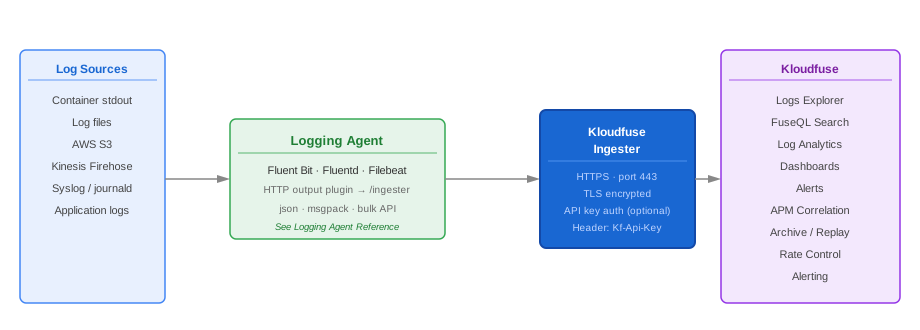
The Kloudfuse log ingestion pipeline has three stages:
-
Collection — a log forwarder reads raw log bytes from a source (container stdout, log files, syslog, AWS S3, Kinesis Firehose).
-
Enrichment — the forwarder attaches metadata: Kubernetes pod and namespace labels, AWS resource tags, custom static fields.
-
Delivery — the forwarder forwards enriched log records to a Kloudfuse ingester endpoint over HTTPS.
Dedicated forwarders and full agents alike follow this same model. The differences lie in their runtime characteristics, which signals they carry, plugin or receiver ecosystems, and the deployment patterns they suit best.
Ingester Endpoints
Each sender has its own endpoint on the Kloudfuse ingester.
The base URL is always https://<kloudfuse-hostname>;.
| Sender | Ingester path | Protocol |
|---|---|---|
Fluent Bit |
|
HTTP POST; body in |
Fluentd |
|
HTTP POST; body in |
Filebeat |
|
Elasticsearch Bulk API over HTTPS; Filebeat uses its native |
Datadog Agent |
|
HTTP POST; configured with |
OTel Collector |
|
OTLP/HTTP; set as the |
Authentication — when ingestion API keys are enabled — is passed in the Kf-Api-Key HTTP header (Fluent Bit, Fluentd, and the OTel Collector’s otlphttp exporter), as the Elasticsearch api_key credential (Filebeat), or as the Datadog Agent’s configured api_key.
See Ingestion Authentication with API Key.
Log Forwarder Comparison
Fluent Bit, Fluentd, and Filebeat are dedicated log forwarders. The Datadog Agent and the OpenTelemetry Collector are full multi-signal agents that can also forward logs to Kloudfuse — reach for them when you already run one for metrics and traces rather than deploying a separate log forwarder. See Datadog Agent Log Forwarding and OTel Kubernetes Integration for their log configuration.
The forwarders are listed as rows so the table stays readable as options are added; each column is a characteristic.
| Forwarder | Runtime | Memory footprint | Signals | Delivery | Best for Kloudfuse when |
|---|---|---|---|---|---|
Fluent Bit |
C — single binary, ~650 KB |
Very low (~5–50 MB/node) |
Logs (metrics via plugins) |
In-memory or filesystem buffering |
You want the lowest-overhead DaemonSet on Kubernetes or ECS |
Fluentd |
Ruby — daemon, ~40 MB |
Moderate (~100–200 MB/instance) |
Logs |
Persistent disk buffering; per-output guarantees |
You need a central aggregator that fans out to multiple destinations |
Filebeat |
Go — single binary, ~30 MB |
Low (~30–60 MB/node) |
Logs |
Filesystem registry; at-least-once |
You already run Filebeat for Elastic, or need S3 log ingestion |
Datadog Agent |
Go — full agent |
Moderate (~200–400 MB with all features) |
Logs, metrics, traces, events |
Disk-backed buffer; at-least-once |
You already run the Datadog Agent, or want one agent for every signal |
OTel Collector |
Go — full collector |
Moderate (~100–300 MB per pipeline) |
Logs, metrics, traces |
Memory or file-storage queue |
You want open-standard OTLP collection, or already run an OTel Collector |
For the dedicated forwarders, the deeper differentiators are their plugin ecosystems and Kubernetes-metadata enrichment: Fluent Bit uses a native kubernetes filter and Lua scripting; Fluentd offers roughly 1,000 community plugins with the kubernetes_metadata_filter; Filebeat uses Elastic Beat modules and the add_kubernetes_metadata processor.
Deployment Patterns
Kubernetes DaemonSet
The most common pattern for Kubernetes log collection.
One forwarder pod runs on every node and reads container log files directly from the node filesystem at /var/log/containers/ and /var/log/pods/.
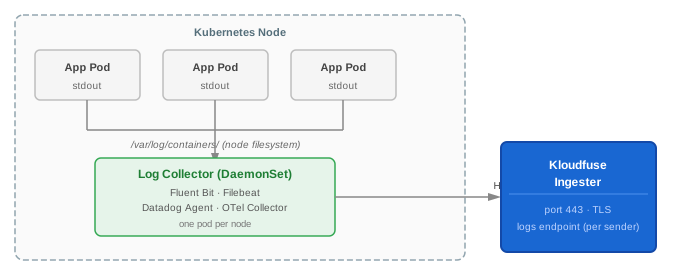
Recommended forwarder: Fluent Bit (lowest node overhead) or Filebeat (if already in your stack).
Configuration highlights:
-
Tail input from
/var/log/containers/*.log -
Apply the Kubernetes metadata filter to attach pod name, namespace, and labels
-
Set
refreshIntervalorRefresh_Intervalto discover new pods quickly -
Mount
/var/logand/var/lib/docker/containersas read-only volumes in the DaemonSet spec
Both Fluent Bit and Filebeat ship a Helm chart that configures this pattern automatically. See Fluent Bit Helm Installation and Filebeat Helm Installation.
The Datadog Agent and OTel Collector also run as DaemonSets for container log collection — one pod per node tailing /var/log/pods.
Use them when you want a single agent to collect logs alongside metrics and traces: see Datadog Agent Log Forwarding and OTel Kubernetes Integration.
Aggregation Gateway
An aggregation gateway receives log records from many upstream sources and forwards them to Kloudfuse as a single outbound connection. This pattern is useful when:
-
You want to centralize routing logic and enrichment in one place.
-
Outbound connectivity from application nodes is restricted; only the gateway egresses to the internet.
-
You need to fan logs out to more than one destination simultaneously.
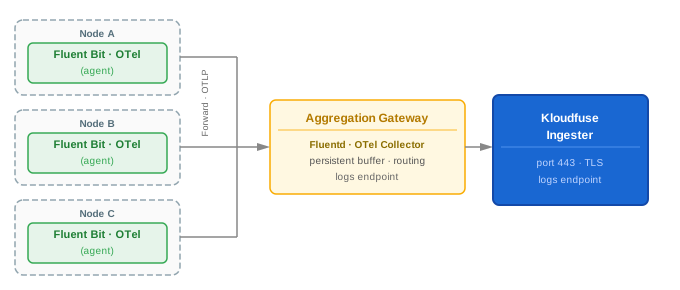
Recommended gateway: Fluentd with lightweight Fluent Bit or Filebeat forwarders on each node, or an OTel Collector in gateway mode fed by node-level OTel Collectors.
Configuration highlights:
-
Forwarder nodes use the Fluent Bit
forwardoutput or Filebeatlogstashoutput to send to the Fluentd gateway; node OTel Collectors use the OTLP exporter to send to the gateway Collector. -
The gateway buffers records to disk, applies enrichment and routing rules, and forwards to Kloudfuse — via the Fluentd HTTP output or the OTel Collector
otlphttpexporter. -
Scale the gateway with Kubernetes replicas; use a headless Service to distribute forwarder connections.
AWS ECS and Fargate with FireLens
On ECS and Fargate, Fluent Bit runs as a sidecar log router using the AWS FireLens integration. The ECS agent configures each application container to route its stdout to the FireLens router automatically.
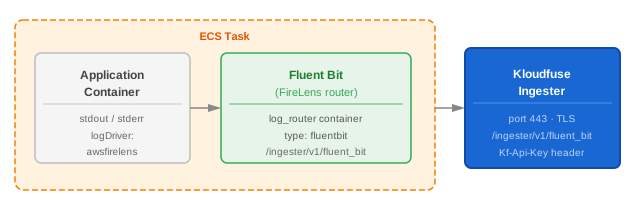
Configuration highlights:
-
Add the Fluent Bit FireLens log router container to your ECS Task Definition.
-
Set
logDriver: awsfirelenson each application container. -
Configure the Fluent Bit HTTP output in the FireLens configuration block.
See ECS and Fargate with FireLens for a worked example.
AWS S3 Log Ingestion
Filebeat’s S3 input plugin periodically scans an S3 bucket and ingests newly written log objects. This pattern is used when logs are archived to S3 by another service (CloudWatch Logs export, ALB access logs, CloudTrail, and so on) and need to be forwarded to Kloudfuse.
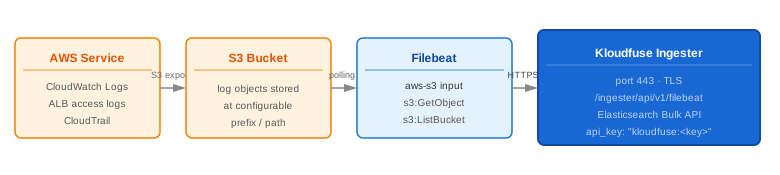
Configuration highlights:
-
Configure the Filebeat
aws-s3input with the bucket name and region. -
Grant Filebeat’s IAM role
s3:GetObjectands3:ListBucketon the source bucket. -
Set a
file_selectorspattern to limit which objects are ingested if the bucket contains mixed content types.
See Ingest Logs from an AWS S3 Bucket for a worked example.
Standalone Host Log Collection
For non-Kubernetes hosts (VMs, bare metal, cloud instances), Fluent Bit, Filebeat, the Datadog Agent, and the OTel Collector can all run directly on the host, tail local log files, and forward them to Kloudfuse.
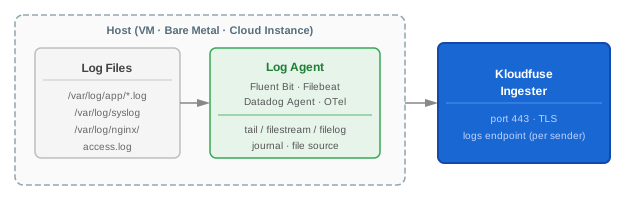
Configuration highlights:
-
Use the
tailinput (Fluent Bit),filestreaminput (Filebeat), alogsfile source (Datadog Agent), or thefilelogreceiver (OTel Collector) to monitor log file paths. -
Set
start_position: beginning(Filebeat) orRead_From_Head On(Fluent Bit) to ingest historical data on first run. -
Use static labels or tags to identify the host and log source.
The Datadog Agent and OTel Collector install as a system service on the host — see Hosts and VM Integration and Hosts and VM Integration.
Choosing a Log Forwarder
| Scenario | Recommended forwarder |
|---|---|
Kubernetes cluster, minimize node overhead |
Fluent Bit — DaemonSet with |
Kubernetes cluster, already running Fluentd via an existing pipeline |
Fluentd — add the Kloudfuse HTTP output alongside existing outputs |
ECS or Fargate workloads |
Fluent Bit — via FireLens log router |
Existing Elastic/ELK stack — migrate or dual-ship to Kloudfuse |
Filebeat — redirect or add the Kloudfuse Elasticsearch output |
Logs archived to AWS S3 (CloudWatch export, ALB, CloudTrail) |
Filebeat — S3 input with the Kloudfuse Elasticsearch output |
Central aggregation gateway with complex routing or enrichment |
Fluentd — persistent buffering and plugin ecosystem |
Edge, IoT, or resource-constrained hosts |
Fluent Bit — minimal memory footprint |
Already running the Datadog Agent for metrics and traces |
Datadog Agent — enable |
Standardizing on OpenTelemetry / OTLP |
OTel Collector — |
Reliability and Delivery Guarantees
Every sender buffers log records locally before delivery and retries on transient network failures. Default behavior differs between them:
| Sender | Default reliability behavior |
|---|---|
Fluent Bit |
In-memory buffer by default.
Set |
Fluentd |
Persistent disk buffer by default when |
Filebeat |
Filesystem registry tracks the last read position in each log file. Delivers at-least-once; survives restarts without log loss as long as the registry file persists. |
Datadog Agent |
Disk-backed log buffer with retry and backoff on failure; at-least-once delivery. |
OTel Collector |
In-memory |
| Kloudfuse’s ingester accepts duplicate log records gracefully — if a forwarder retries after a partial delivery, duplicate records are deduplicated at query time using the record timestamp and source identity. |
Security and Authentication
Log records are always transmitted over TLS (HTTPS) to the Kloudfuse ingester on port 443.
When ingestion authentication is enabled on your cluster, include the API key in every forwarder’s output configuration:
| Sender | How to pass the API key |
|---|---|
Fluent Bit |
|
Fluentd |
|
Filebeat |
|
Datadog Agent |
|
OTel Collector |
|
Store the API key in a Kubernetes Secret and reference it via an environment variable rather than embedding it directly in the configuration file.