Remap Architecture
Remap is the normalization stage in the Kloudfuse ingester. It runs on every log, before parsing or indexing, and turns each agent’s raw payload into one common shape. This page explains where remap sits in the pipeline and how its pieces fit together. For the mapping rules themselves, see Remap Concepts; to edit them, see Edit and Save a Remap Mapping.
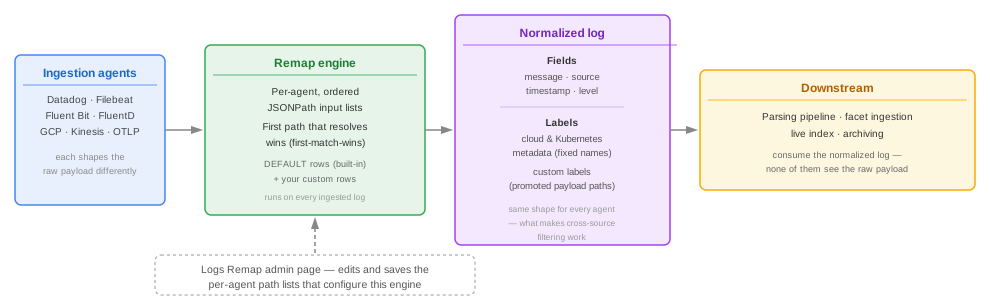
Where remap sits in the pipeline
-
An agent ships a raw payload. Each ingestion agent — Datadog, Filebeat, Fluent Bit, FluentD, GCP, Kinesis, or OTLP — describes the same event differently: Datadog puts the message in
messageand the source inddsource; GCP usestextPayload; OTLP usesbody. -
The remap engine normalizes it. For the sending agent, the engine evaluates each field’s ordered list of JSONPath input paths and takes the first one that resolves. This produces the Core fields (
message,source,timestamp), the engine-derived log level, and any Cloud metadata, Kubernetes, or Custom labels configured for that agent. -
Downstream stages consume the normalized log, not the raw payload. The parsing pipeline, facet ingestion, the live index, and archiving all operate on the fields and labels remap produced. None of them re-read the original agent-specific payload, which is why getting a mapping right at this stage matters — a field remap fails to resolve is a field every later stage is missing too.
Because normalization happens first, archived logs and hydrated logs carry the same fields and labels as live logs — see Archiving Logs and Hydration for how archiving and hydration build on top of this normalized shape.
Components
| Component | Role |
|---|---|
Ingestion agent |
Ships the raw, agent-specific payload to the Kloudfuse ingester. Kloudfuse does not control this shape. |
Remap engine |
Part of the ingester. Holds an ordered, first-match-wins list of JSONPath input paths per field, per agent, and resolves them against each incoming payload. Combines built-in |
Normalized log |
The engine’s output: the |
Logs Remap admin page |
The editor for the engine’s per-agent path lists. Shows a live or hand-edited sample, the rules applied to it, and the real engine’s output side by side. See Edit and Save a Remap Mapping. |
Configuration is per agent, applied globally
Each agent tab on the Logs Remap page — Datadog, Filebeat, Fluent Bit, FluentD, GCP, Kinesis, OTLP — has its own independent set of path lists. Saving applies the configuration for every agent at once, globally across the cluster, and takes effect within about 30 seconds. It is not scoped per tenant or per agent instance, and it does not reprocess logs already ingested — see Save behavior.
Enabling the remap engine
The remap engine itself is controlled by a deployment-level setting, global.logs.remap.enabled in deployments.yaml. As of Release 4.3.0 it is enabled by default, alongside the archive writer it feeds. See Archive Writer and Ingest Integration.
global:
  logs:
    remap:
enabled: trueWhen this is false, the ingester does not run the new Remap engine. Instead it publishes the raw payload to the legacy pipeline, where the separate log-parsing service normalizes it using the classic parsing pipeline configuration.
The Logs Remap admin page is not gated by this setting — it renders and lets you edit and save path lists regardless of whether the engine is enabled. If global.logs.remap.enabled is false, saved changes have no effect on ingestion: the ingester is not running the remap dispatcher, so nothing consumes them. There is no warning in the UI for this state. If mappings you save do not appear to affect ingested data, confirm the setting with your Kloudfuse contact before assuming the mapping itself is wrong.
|
Next steps
-
Remap Concepts — how the engine resolves paths and what each mapping section controls
-
Edit and Save a Remap Mapping — edit and save a mapping
-
Log Parsing Configuration — the parsing stage that runs on the normalized event