Events Architecture
Overview
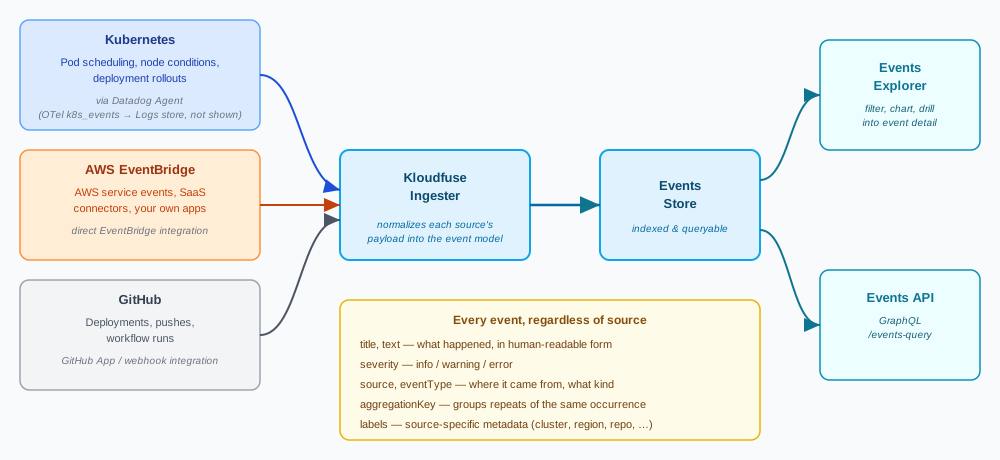
An event is a discrete, point-in-time record that something changed: a deployment rolled out, a pod was OOMKilled, a user logged in, a sync operation completed. Kloudfuse ingests events from Kubernetes, cloud platforms, and third-party integrations, and makes them queryable and filterable in the Events Explorer alongside the rest of your telemetry.
Events vs. logs vs. traces
Events, logs, and traces all originate from something happening in your system, but they answer different questions and are shaped differently:
- Logs
-
A continuous, largely unstructured stream of lines an application writes as it runs — one line per statement the code chose to log. Volume scales with how much code executes; there is no inherent concept of "this line is more significant than that one" until you parse and filter it. Logs answer "what did the application say happened, in its own words."
- Traces
-
A structured record of one request’s path through every service, database call, and queue it touched, linked by a shared trace ID. A trace only exists because a request happened; it captures causality and timing across service boundaries. Traces answer "where did this specific request spend its time, and where did it fail."
- Events
-
A discrete record that the system itself changed state, independent of any single request. An event has a title, a severity (
info,warning, orerror), a source, and a timestamp, but no ongoing duration and no child spans. Events are comparatively sparse — one per occurrence, not one per operation — which makes them well suited to answering "what changed right before this metric moved," or to serving as an audit trail of deployments, scaling actions, and infrastructure changes.
Because events are sparse and state-oriented, they’re most useful in Kloudfuse alongside metrics: overlay an event stream on a metric chart to see whether a spike lines up with a deployment, a node event, or an external change, without having to search logs or traces for a matching timestamp.
The event model
Every event has:
- title
-
A short, human-readable summary of what happened.
- text
-
The full event body — often multi-line, and may include Markdown-style formatting depending on the source.
- severity
-
info,warning, orerror. - source
-
Where the event originated —
kubernetes,aws,github, and so on. See Event sources. - eventType
-
A source-specific classification of the event (for example,
kubernetes_apiserver). - aggregationKey
-
Groups related events together, so a burst of the same underlying occurrence (for example, repeated pod restarts) can be counted as one series instead of flooding the list.
- host
-
The host or agent that reported the event, when applicable.
- labels
-
Source-specific key-value metadata attached to the event — for Kubernetes events, this includes cluster, namespace, and workload identifiers.
These fields are what you filter, group, and search on in the Events Explorer, and what the Events API returns.
Event sources
Kloudfuse ingests events from multiple sources, for centralized visibility into infrastructure and application changes alongside your metrics, logs, and traces.
Kubernetes events
Kubernetes events — pod scheduling, node conditions, deployment rollouts, and similar object-level changes — reach Kloudfuse through whichever collection agent you use for the rest of your Kubernetes telemetry, but the two paths land in different stores:
-
Datadog Agent — the Cluster Agent collects Kubernetes events via the Kubernetes API and sends them into the Events store described on this page, queryable in the Events Explorer and Events API. See Configure Events.
-
OpenTelemetry Collector — the
k8s_eventsreceiver collects Kubernetes events through a dedicated logs pipeline, but Kloudfuse stores them in the Logs store, not the Events store — they don’t appear in the Events Explorer or Events API. Query them from Logs with thekf_events_agent="otlp"label. See Verify Events Are Arriving.
AWS EventBridge
Kloudfuse integrates directly with AWS EventBridge to receive real-time events from AWS services, SaaS connectors, and your own applications. See AWS EventBridge Integration.
GitHub Events
Kloudfuse ingests GitHub events — for example, deployments, pushes, and workflow runs — so you can correlate application behavior with changes to your codebase. See GitHub CI/CD Webhook Integration.