Log Parsing Architecture
Kloudfuse extracts a fingerprint, a set of facets, and a timestamp from every log line automatically, with no configuration required — see How a log line reaches the Logs Store. This page covers when and why to reach for the configuration in Log Parsing Configuration, how its stages fit into the wider pipeline, and where it currently falls short.
Why configure log parsing
Most sources need nothing beyond the automatic extraction — JSON messages are auto-parsed field by field, and the built-in heuristic finds a reasonable fingerprint and facet set for plain-text lines too. Reach for the configuration reference when:
-
A plain-text format isn’t extracted precisely enough. The automatic heuristic is tuned for common shapes; a log line with an unusual structure may need an explicit dissect or grok pattern to extract the right fields instead of one generic catch-all facet.
-
A value needs to be filterable and groupable as a label, not just a facet. Facets are per-line and prefixed with
@in a search; promoting one to a label — Transform — makes it a first-class, always-indexed field likelevelorsource, and adds it to the sidebar’s LABELS groups instead of FACETS. -
A label needs to be added, replaced, or derived conditionally. Relabel rules can set a fixed label value (tag every log from a source with
env=production) or combine existing labels, optionally scoped to logs matching a condition. -
A single log line produces more facets than the default ceiling. JSON auto-parsing stops at 50 facets per line by default; raise it with
skipAutoFacetif your JSON payloads are legitimately wider than that — see JSON logs.
If none of these apply, the automatic extraction is doing its job and this configuration isn’t needed.
How the stages fit together
The parsing pipeline runs after a log’s raw payload has already been normalized into a common shape (message, timestamp, source) — that normalization is now a separate concern, handled by Logs Remap (or, for deployments still on it, the deprecated Remap stage documented on this page).
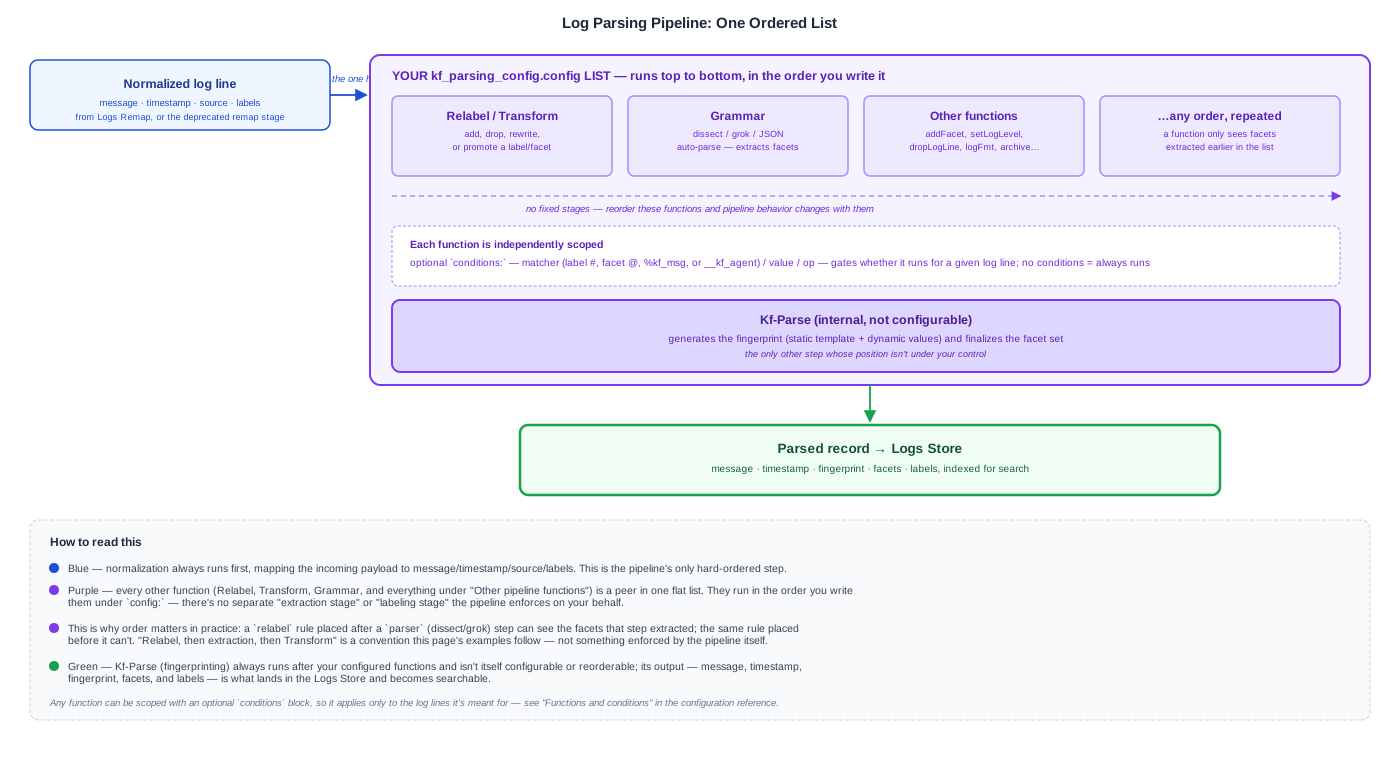
From there, there’s only one hard rule: normalization always runs first. Every other function you configure — Relabel, Grammar (dissect/grok/JSON auto-parsing), Transform, and everything under Other pipeline functions — is a peer in one flat, ordered list, and runs in the order you list it. "Relabel first, then extraction, then Transform last" is the common convention (and the order the examples on this page follow), not something the pipeline enforces — a relabel rule placed after a parser step can see the facets that step extracted, and one placed before it can’t. Only Kf-Parse, which generates the log’s fingerprint, is internal and not configurable or reorderable.
Every function — at any position in the list — can be scoped with a conditions block, so a dissect pattern or a relabel rule applies only to the logs it’s meant for rather than every line the pipeline processes; see Functions and conditions.
Limitations
-
No live preview. Unlike the newer Logs Remap admin page, there’s no in-browser way to preview a pipeline change against real traffic before deploying it. Validate a change in a lower environment first.
-
Deploying a change requires a redeploy. Once you’ve tested a change, applying it takes effect only after
logs-parserpicks up the updated Helm values — there’s no hot-reload or ~30-second live apply the way Logs Remap has. -
Configuration is global, not per-tenant. The pipeline config is one set of Helm values for the whole deployment. Individual functions can be scoped with
conditions(see above), but there’s no separate configuration surface per team or namespace. -
A default 50-facet ceiling per log line. JSON auto-parsing silently stops extracting beyond 50 facets unless you raise the limit with
skipAutoFacet— see JSON logs. -
Heuristic extraction isn’t guaranteed accurate. The automatic facet and timestamp detection for non-JSON messages is a best-effort heuristic. It works well for common formats, but an unusual one can produce an imprecise fingerprint or a single generic facet where a custom grammar pattern would extract several precise ones.
-
Parsing can only extract what’s already in the message. It cannot recover information a log line never included in the first place — that has to come from the application or the collection agent, not from a pattern applied after the fact.
-
Relabel here is logs-only. This pipeline’s
relabel/transformaction set is specific to logs. Metrics, Events, and Traces relabeling is a separate, ingester-level mechanism with its own (genuinely Prometheus-compatible) configuration — see Relabel Rules — so a rule written for one does not carry over to the other.
Next steps
-
Log Parsing Configuration — the configuration reference: remap, relabel, grammar, JSON auto-parsing, and transform, with examples
-
Logs Explorer Architecture — how a log line becomes searchable end to end
-
Logs Remap — the current, UI-editable normalization stage that precedes this pipeline