Continuous Profiling Architecture
Kloudfuse Continuous Profiling is built on Grafana Pyroscope. This page explains how profiles get from your applications into Kloudfuse, where they are stored, how long they are kept, and how they are queried. For the settings themselves, see Configure Continuous Profiling.
Overview
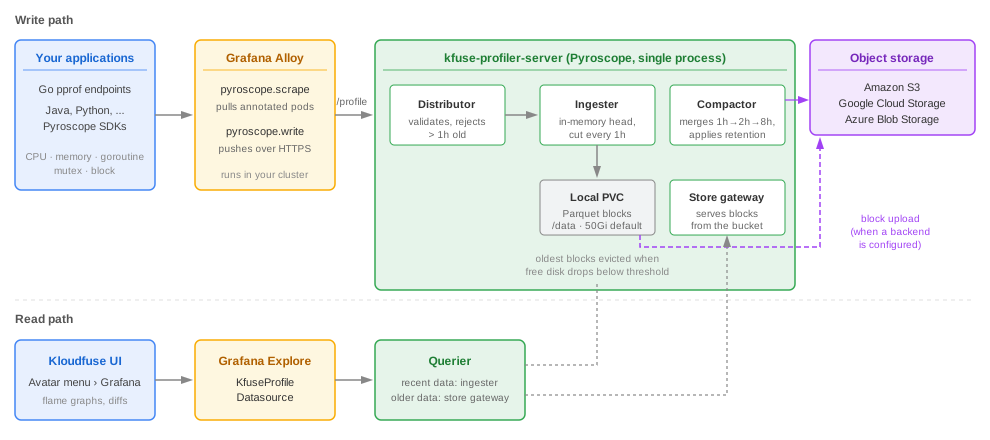
Profiling has three moving parts:
-
A collector in your cluster. Grafana Alloy scrapes profiles from your applications, or your applications push them with a Pyroscope SDK.
-
The profiler server in Kloudfuse. A single Pyroscope process,
kfuse-profiler-server, that ingests, stores, compacts, and serves profiles. -
Storage. A local persistent volume always, plus an object storage bucket that you own when you want to keep data past what the volume holds.
The write path
-
Collect. Alloy discovers pods that carry the
pyroscope.io/scrape: "true"annotation and pulls profiles from their/debug/pprof/*endpoints on a schedule. Applications that use a Pyroscope language SDK push profiles directly instead. -
Send. Alloy’s
pyroscope.writecomponent sends the profiles over HTTPS tohttps://<your-kloudfuse-host>/profile. The Kloudfuse ingress strips the/profileprefix and forwards the request tokfuse-profiler-serveron port4040. -
Validate. The distributor checks each profile against the configured limits. It rejects profiles with timestamps more than 1 hour in the past or 10 minutes in the future, so a collector that falls behind loses that data instead of back-filling it.
-
Buffer. The ingester holds incoming profiles in an in-memory head block.
-
Write blocks. Every hour, the ingester cuts the head into an immutable block in Apache Parquet format and writes it to the local volume at
/data. -
Upload (optional). When an object storage backend is configured, the ingester uploads each finished block to your bucket.
Storage tiers
| Local volume only (default) | Local volume plus object storage | |
|---|---|---|
Where blocks live |
The |
Every finished block is uploaded to your S3, GCS, or Azure bucket. Once a block is uploaded and more than 4 hours old, its local copy is deleted, so the volume holds only recent blocks. |
How long data is kept |
Until the volume fills. There is no time-based retention. |
As long as you choose, set with |
What happens when the disk fills |
The oldest blocks are deleted. |
The oldest local blocks are deleted but their copies in the bucket remain queryable. |
Compaction |
None. |
The compactor merges 1-hour blocks into 2-hour and then 8-hour blocks in the bucket, which makes long-range queries cheaper. |
Local disk retention
Every 5 minutes, the profiler server cleans up the local volume:
-
Uploaded blocks. When object storage is configured, it deletes local blocks that have been uploaded to the bucket and are more than 4 hours old. Queries for that data go to the bucket instead.
-
Free space. With or without object storage, it deletes the oldest blocks until both of these thresholds are met:
-
at least
min_disk_available_percentageof the volume is free. Kloudfuse sets this to0.20(20%). -
at least
min_free_disk_gbGiB are free. The Pyroscope default is10.
-
How much history fits on the volume depends on profile volume: the number of services, profile types, and the cardinality of their labels. To keep more local history, increase pyroscope.pyroscope.persistence.size.
Object storage retention
When a backend is configured, the compactor enforces retention in the bucket. It deletes blocks whose data is older than limits.compactor_blocks_retention_period. The default is 0s, which disables deletion and keeps data forever. Set it to a duration such as 30d or 90d to cap storage cost.
Set retention with compactor_blocks_retention_period rather than a bucket lifecycle rule. The compactor keeps an index of the blocks in the bucket, and deleting objects behind its back can leave that index pointing at missing data.
The read path
-
In the Kloudfuse UI, open the avatar menu, select Grafana, open Explore, and choose the
KfuseProfileDatasourcedata source, which points atkfuse-profiler-server:4040. In the legacy UI, Grafana › Profiler opens the same view. -
The querier answers each query by merging two sources:
-
recent data from the ingester’s in-memory head and its local blocks;
-
older data from the store gateway, which reads blocks from the object storage bucket.
-
-
Grafana renders the result as a flame graph, a time series, or a diff between two time ranges.
Without object storage, queries can reach back only as far as the oldest block still on the local volume.
Components
| Component | Role |
|---|---|
Grafana Alloy |
Runs in the cluster you are profiling. Discovers annotated pods, scrapes their profiles, and forwards them to Kloudfuse. You install and manage it. |
|
A StatefulSet that runs Pyroscope 1.7.1 with |
Persistent volume |
One per replica, starting with |
Object storage bucket |
Optional. Your S3, GCS, or Azure Blob Storage container for long-term retention. |
|
The Grafana data source that the Kloudfuse UI uses to query profiles. |
The kfuse-profiler deployment is a different component. It profiles Kloudfuse’s own services for self-monitoring and is controlled by global.observability. See Self Monitoring - Kloudfuse.
Limitations
-
Not available with FIPS. When
global.fips.enabledistrue, the/profileingest route is not created. -
Single replica by default. The profiler server runs as one pod, so ingest is unavailable while it restarts. Multi-AZ deployments run 3 replicas and require object storage; see HA Multi-AZ Setup.
-
No back-filling. Profiles older than 1 hour are rejected at ingest.
Next steps
-
Configure Continuous Profiling — enable profiling and start sending profiles.
-
Store Profiles in Amazon S3, Store Profiles in Google Cloud Storage, or Store Profiles in Azure Blob Storage — configure long-term retention.