Rate Control Architecture
Rate control runs in the Kloudfuse ingesters. Each ingester pod reads the rate control policy for every stream, turns each class into a token bucket sized to its share of the policy, and checks every incoming data point against the bucket of the one class it belongs to. A data point that finds a token is ingested; one that finds the bucket empty is dropped.
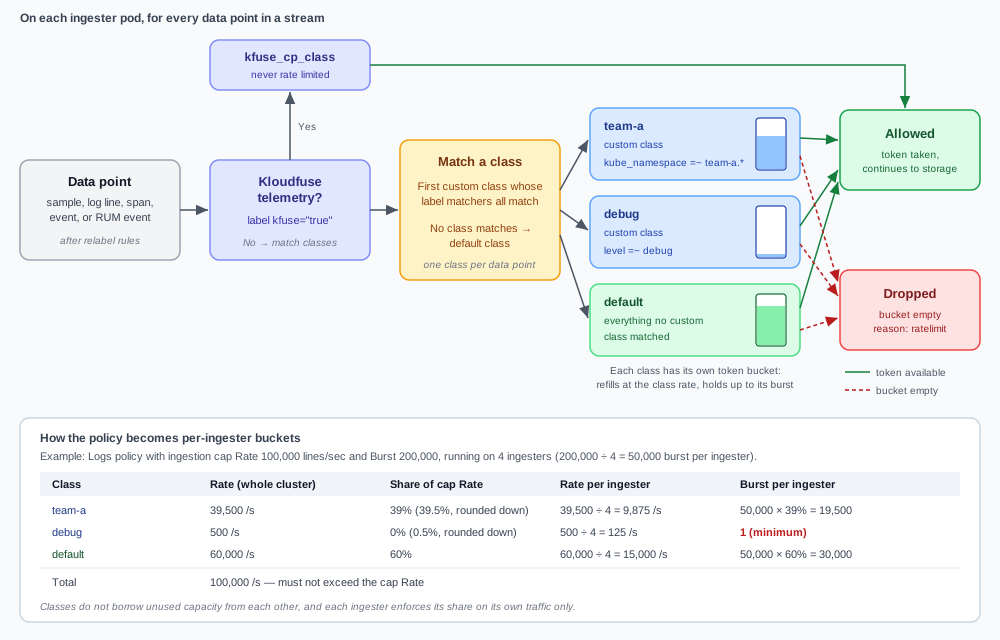
How a data point is handled
Each ingester handles every data point in a stream the same way:
-
Relabel rules run first. For metrics, traces, events, and RUM, the stream’s relabel rules run before rate control. Data a relabel rule drops never reaches rate control and never uses a token, and class matchers see the labels as the relabel rules left them, including any labels added by an ingestion API key.
-
Kloudfuse telemetry is set aside. Data with the label
kfuse="true"— Kloudfuse’s own telemetry — goes to thekfuse_cp_classclass and is never rate limited. -
The data point is assigned to one class. The ingester compares the data point’s labels with each custom class’s label matchers. The data point belongs to the first class whose matchers all match. If no custom class matches, it belongs to the default class.
-
The class’s bucket is checked. If the class’s token bucket on this ingester has a token, the ingester takes it and the data point continues to storage. If the bucket is empty, the data point is dropped and counted with the drop reason
ratelimit.
A data point counts against exactly one class. If its labels match more than one custom class, only the first matching class applies, so avoid matchers that overlap.
Rate control only drops data. It does not queue, delay, or sample it.
The default class
The default class is the catch-all: every data point that no custom class matches is counted against the default class’s rate. A policy with no custom classes limits the whole stream through the default class alone.
The default class is a bucket like any other. It does not take over capacity that custom classes leave unused, and custom classes do not borrow from it. If a custom class is throttled while the default class has room to spare, raise the custom class’s rate; traffic does not spill from one class to another.
Watch the Default Class Share panel on the Rate Control dashboard. A high share means most traffic is not matched by any custom class and competes for the default class’s rate.
The ingestion cap
The ingestion cap’s Rate is the budget that the classes share. The default class’s rate plus the rates of all custom classes cannot exceed it, and Kloudfuse rejects a policy that does. The ingesters enforce the class rates; the cap is not a separate limit on top of them.
The cap also sets each class’s share: its rate as a whole percentage of the cap Rate, rounded down. The share decides how much of the Burst each class gets.
A stream without a policy is not rate limited.
Limits per ingester
Each ingester enforces its part of the policy on the traffic it receives, without coordinating with the other ingesters:
-
Rate per ingester = class rate ÷ number of ingesters.
-
Burst per ingester = (cap Burst ÷ number of ingesters) × the class’s share. A class always gets a burst of at least 1.
The diagram shows a Logs policy with a cap of 100,000 lines/sec and a burst of 200,000 on 4 ingesters. Each ingester receives a quarter of each class’s rate and 50,000 of the burst, divided by share:
| Class | Rate | Share | Rate per ingester | Burst per ingester |
|---|---|---|---|---|
|
39,500 |
39% |
9,875 |
19,500 |
|
500 |
0% |
125 |
1 |
|
60,000 |
60% |
15,000 |
30,000 |
Because the limit is divided evenly, the load balancer’s distribution matters. When one ingester receives more than its share of a class’s traffic, that ingester throttles the class even though the class’s total traffic is under its rate.
The number of ingesters each pod divides by is read when the ingester starts: ingester.replicaCount in your Helm values or, if that is not set, global.numNodes. If the number of running ingesters differs from that count, the total limit enforced across the cluster differs from the policy. If you run Kloudfuse with node pools (global.kfRoles), set ingester.replicaCount explicitly so the count matches the number of ingester pods.
How burst works
Each class’s bucket refills at the class’s per-ingester rate and holds at most the class’s per-ingester burst. While traffic stays under the rate, unused tokens collect in the bucket up to the burst. A spike can then use the stored tokens, so up to a burst’s worth of data points get through at once before the class falls back to its sustained rate. When the bucket is empty, the data points that exceed the rate are dropped until it refills.
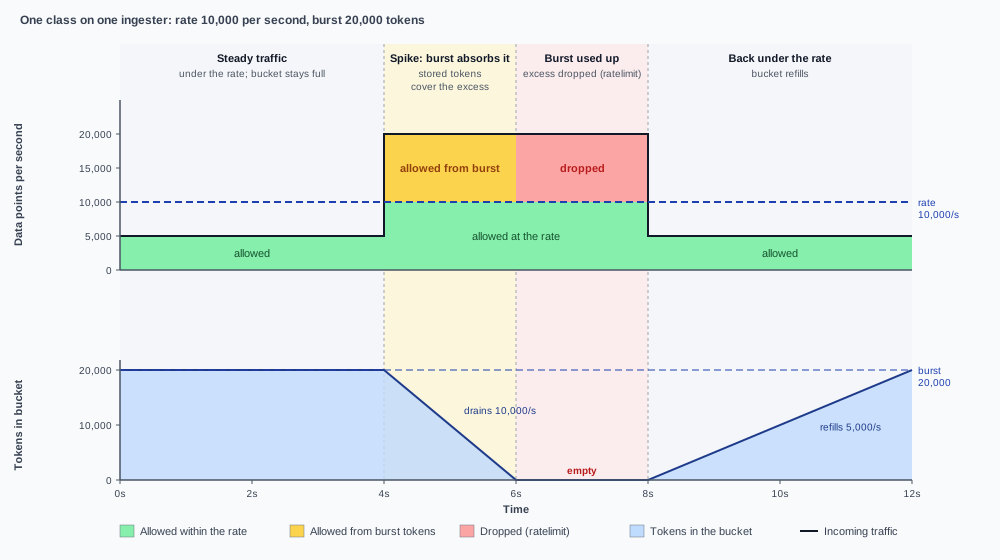
The diagram follows one class on one ingester, with a per-ingester rate of 10,000 data points per second and a burst of 20,000:
-
Steady traffic. At 5,000 per second, traffic stays under the rate and the bucket stays full at 20,000 tokens.
-
Spike. Traffic jumps to 20,000 per second, 10,000 over the rate. The stored tokens cover the excess, so everything is allowed while the bucket drains by 10,000 tokens each second.
-
Burst used up. After 2 seconds the bucket is empty. The class is held to its rate: 10,000 per second is allowed and the other 10,000 per second is dropped with the reason
ratelimit. -
Recovery. Traffic falls back to 5,000 per second. The 5,000 unused tokens each second refill the bucket, which is full again 4 seconds later, ready for the next spike.
Some data takes several tokens at once, and is allowed or dropped as a whole:
-
Metrics take one token per sample, checked one time series at a time: a series that carries ten samples in one write needs ten tokens together.
-
Logs from batched sources, such as CloudWatch logs through Kinesis Firehose and Heroku, are checked one batch at a time: a batch of 50 log lines needs 50 tokens together.
A request for more tokens than the class’s per-ingester burst is always dropped, even when the bucket is full.
Size the burst relative to the rate. With a cap Burst equal to the cap Rate, each class can absorb about one second of traffic in a single spike; with a Burst of N times the Rate, about N seconds.
Classes with a small share get little or no burst. Shares are whole percentages rounded down, so a class with less than 1% of the cap Rate — debug in the example — gets a burst of 1. Every data point beyond its steady trickle is dropped, and the class can show drops on the dashboard while its average traffic is well under its rate. For metrics, a class with a burst of 1 drops every series that arrives with more than one sample. To give a small class headroom, raise its rate to at least 1% of the cap, or lower the cap Rate so its share grows.
The dashboards do not show the burst size.
Classes that drop everything
Some classes drop every data point they match:
-
A class with a rate of
0. Its bucket never refills. Use this deliberately to filter traffic out at ingestion. Classes created for an ingestion API key start with a rate of0. -
A class rule that names a class the policy does not define. The ingester has no limit for that class, so it drops everything the rule matches. The Rate Control dashboard shows these as Unconfigured classes.
Next steps
-
Rate Control Policies — set the cap, the default class, and custom classes.
-
Rate Control Dashboard — see how close each class is to its limit and what it drops.